 图码
图码2.4 循环链表
循环链表是一种数据结构,其中最后一个节点的next连接回到第一个节点,形成一个循环。此结构允许连续遍历而不会中断。
循环链表对于日程安排和音乐播放列表等任务特别有用,这允许播放完毕后回到第一首继续播放。
在这小节中,我们将介绍循环链表的基础知识、如何使用它们、它们的优点和缺点以及它们的应用。
什么是循环链表?
循环链表是一种特殊类型的链表,其中所有节点都连接起来形成一个环。
与我们前面讲到的链表不同的是,循环链表中的最后一个节点的next指向第一个节点。这意味着当遍历到尾部时可以继续向头部遍历。
循环链表是从单链表和双链表扩展出来的,因此,循环链表基本只有这两种类型。
循环单链表
在循环单链表中,每个节点只有一个指针,称为next指针。 最后一个节点的next指针指向第一个节点,这样就形成了一个环。在循环单链表中,我们只能沿一个方向遍历链表。
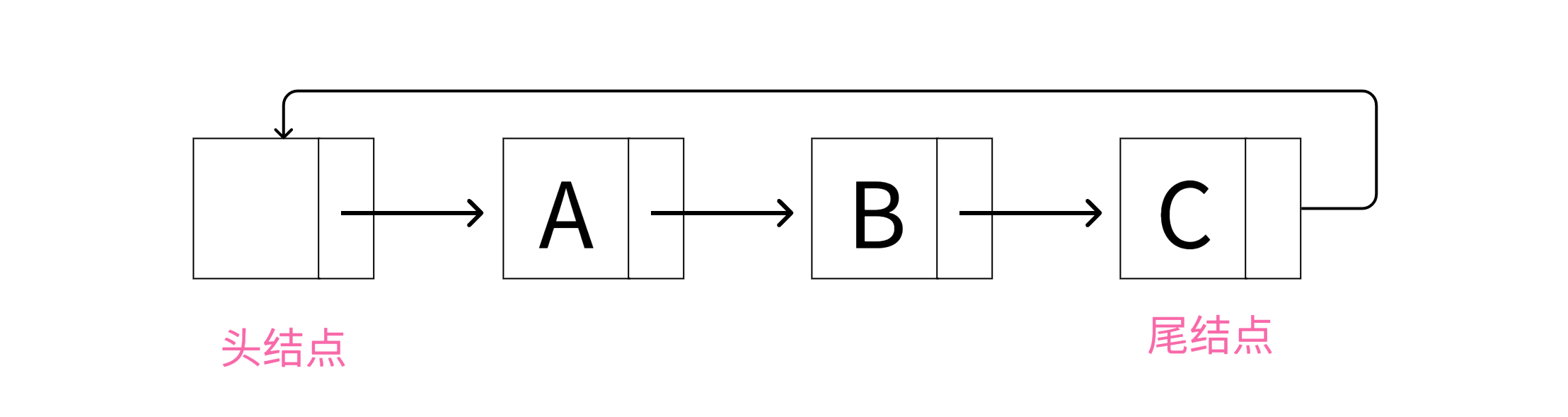
循环单链表结构
数据结构
- 1
- 2
- 3
- 4
- 5
- 6
- 7
- 8
- 9
- 10
- 11
- 12
- 13
typedef struct LNode {
int data;
struct LNode* next;
} LNode, *LinkList;
LNode* pTemp = (LNode*)malloc(sizeof(LNode));
pTemp->data = e;
pTemp->next = p->next; // 将新节点的next指向p的下一个节点
p->next = pTemp; // 更新p的next指向新节点,完成插入操
// 完整代码:https://totuma.cn- data:数据域,也是节点的值
- next:指针域,指向下一个结点的指针
在上面的定义中,每个节点都有data数据域和next指针域,和普通的单链表结构一模一样,唯一区别就是当我们为循环链表创建多个节点时,我们只需要将最后一个节点连接回第一个节点即可。
循环单链表的基本操作实现
创建循环单链表
插入是链表中的基本操作。和普通单链表的唯一区别是将最后一个节点的next连接到第头结点。
插入大概可以分为以下三种情况
1.在空链表中插入新结点

在空链表中插入新结点
这里使用的是带头结点的单链表来实现循环链表,所以链表空的条件是头结点的next指向头结点,即头结点自己指向自己。
在空的循环链表中插入一个节点,需要创建一个新结点,将其next指针指向头结点,以达到循环的目的。
2.在链表中部插入新结点
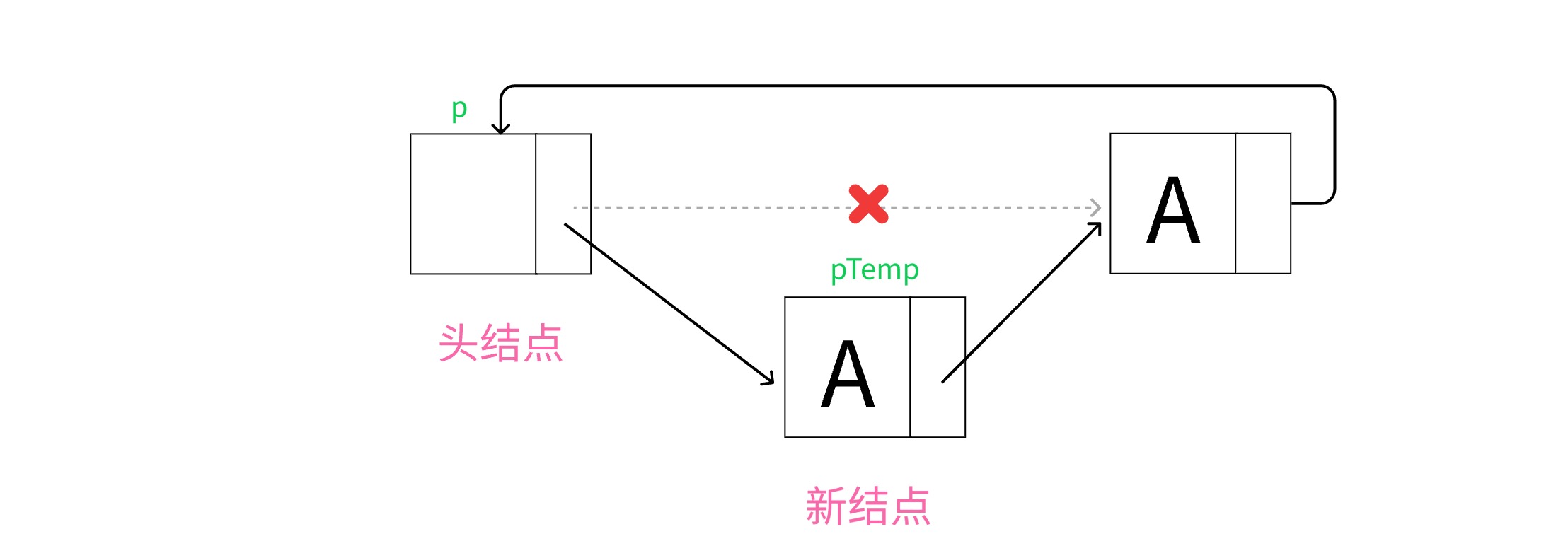
在链表中部插入新结点
和普通单链表操作一样,在中部插入结点并没有改变尾结点next的指向。
3.在链表尾部插入新结点
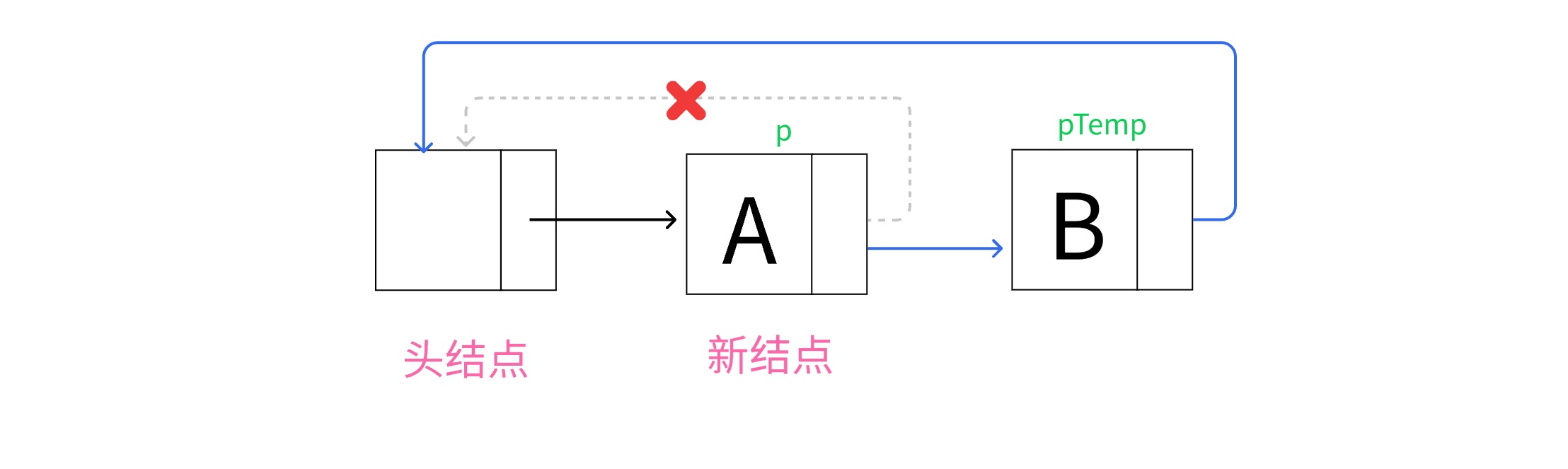
在链表尾部插入新结点
- 1
- 2
- 3
- 4
- 5
- 6
- 7
- 8
- 9
- 10
- 11
- 12
- 13
typedef struct LNode {
int data;
struct LNode* next;
} LNode, *LinkList;
LNode* pTemp = (LNode*)malloc(sizeof(LNode));
pTemp->data = e;
pTemp->next = p->next; // 将新节点的next指向p的下一个节点
p->next = pTemp; // 更新p的next指向新节点,完成插入操
// 完整代码:https://totuma.cn上面三种情况,都可以统一为同一操作:
1.找到待插入位置的前驱结点,即p;
2.创建新结点pTemp;
3.使pTemp的next指向p的next;
(如果是空链表,那么p的next指向头结点本身。如果是在末尾插入,p的next同样也是指向头结点)
4.使p的next指向pTemp;
按位序插入结点 | 可视化完整可视化
2.4 Detailed Explanation of Circular Singly Linked Lists - Linear Lists Tutorial Visualize your code with animations

Understanding Linked Lists: A Complete Guide for Data Structure Learners
Welcome to your comprehensive guide on linked lists, one of the most fundamental data structures in computer science. If you are learning data structures and algorithms, understanding how linked lists work is essential for building a strong foundation. This article will explain the principles, characteristics, and real-world applications of linked lists, and show you how a data structure visualization platform can make learning these concepts much easier.
What is a Linked List?
A linked list is a linear data structure where elements, called nodes, are stored in a sequence. Unlike arrays, which store elements in contiguous memory locations, linked lists use pointers or references to connect each node to the next one. Each node contains two parts: the data itself, and a reference (or link) to the next node in the sequence. The first node is called the head, and the last node points to null, indicating the end of the list.
Think of a linked list like a treasure hunt where each clue tells you where to find the next clue. You start at the first clue (the head), follow the instructions, and move to the next location until you reach the end. This structure gives linked lists unique properties that make them different from arrays and other data structures.
Types of Linked Lists
There are several variations of linked lists, each designed for specific use cases. Understanding these types will help you choose the right one for your programming needs.
Singly Linked List: This is the simplest form. Each node has a single pointer that points to the next node. You can traverse the list in only one direction, from head to tail. This type is memory-efficient but does not allow backward traversal.
Doubly Linked List: In this version, each node contains two pointers: one pointing to the next node and another pointing to the previous node. This allows traversal in both forward and backward directions. While it uses more memory due to the extra pointer, it provides greater flexibility for operations like deletion and insertion.
Circular Linked List: In a circular linked list, the last node points back to the first node instead of null. This creates a circular structure that can be useful for applications requiring continuous looping, such as round-robin scheduling. Circular lists can be either singly or doubly linked.
How Linked Lists Work: Core Operations
To truly understand linked lists, you need to know how basic operations are performed. Here are the key operations every learner should master.
Insertion: Adding a new node to a linked list can happen at the beginning, end, or middle of the list. Insertion at the beginning is very fast because you only need to update the head pointer. Insertion at the end requires traversing the entire list to find the last node, which takes linear time. Insertion in the middle requires finding the correct position and adjusting the pointers of neighboring nodes.
Deletion: Removing a node from a linked list also requires pointer manipulation. To delete a node, you need to update the pointer of the previous node to skip the node being deleted. In a singly linked list, you must traverse from the head to find the node before the one you want to delete. In a doubly linked list, you can directly access the previous node using the backward pointer.
Traversal: To access or search for elements, you must start at the head and follow the pointers one by one. This is called traversal. Unlike arrays, you cannot directly access the nth element of a linked list. You must walk through the list from the beginning, which takes linear time in the worst case.
Searching: Searching for a specific value in a linked list requires traversal. You compare each node's data with the target value until you find a match or reach the end. The time complexity is O(n), where n is the number of nodes in the list.
Advantages and Disadvantages of Linked Lists
Every data structure has its strengths and weaknesses. Knowing these will help you decide when to use a linked list versus other structures like arrays or trees.
Advantages: Linked lists offer dynamic memory allocation, meaning they can grow or shrink during program execution without wasting memory. Insertion and deletion operations are efficient, especially at the beginning of the list, because no shifting of elements is required. Linked lists are ideal for implementing stacks, queues, and other abstract data types.
Disadvantages: Linked lists use extra memory for storing pointers, which can be significant for large lists. Accessing elements is slow because you cannot directly index into a linked list. This makes random access operations inefficient. Additionally, linked lists have poor cache locality compared to arrays, which can impact performance in modern computer architectures.
Real-World Applications of Linked Lists
Linked lists are not just theoretical concepts. They are used in many real-world systems and applications. Understanding these use cases will help you appreciate why linked lists are important.
Undo Functionality in Software: Many applications, such as text editors and image editors, use linked lists to implement undo operations. Each action is stored as a node in a linked list, and you can traverse backward to undo previous actions.
Music Playlists: Music players often use linked lists to manage playlists. Each song is a node, and you can easily add or remove songs, or shuffle the order by rearranging pointers.
Image Galleries: Photo viewing applications use linked lists to navigate through images. Each image is linked to the next and previous ones, allowing smooth forward and backward browsing.
Operating System Task Scheduling: Circular linked lists are used in round-robin scheduling algorithms, where each process gets a fixed time slice, and the scheduler cycles through processes in a circular manner.
Hash Table Collision Resolution: In hash tables, linked lists are often used to handle collisions. When two keys hash to the same index, they are stored in a linked list at that index, allowing multiple entries to coexist.
Polynomial Arithmetic: Linked lists can represent polynomials, where each node stores a coefficient and an exponent. This makes addition and multiplication of polynomials more efficient.
Comparing Linked Lists with Arrays
As a data structures learner, you will frequently compare linked lists with arrays. Here is a clear comparison to help you understand when to use each.
Memory Allocation: Arrays use static memory allocation, meaning their size is fixed at creation. Linked lists use dynamic memory allocation, allowing them to grow and shrink as needed.
Access Time: Arrays provide O(1) random access, meaning you can directly access any element using its index. Linked lists require O(n) time to access an element because you must traverse from the head.
Insertion and Deletion: Arrays require shifting elements when inserting or deleting, which takes O(n) time. Linked lists can insert or delete in O(1) time if you have a reference to the relevant node, but finding that node may take O(n) time.
Memory Overhead: Arrays have no overhead for pointers, making them more memory-efficient for storing simple data. Linked lists require extra memory for pointers, which can double the memory usage for small data types.
Cache Performance: Arrays have excellent cache locality because elements are stored contiguously. Linked lists have poor cache locality because nodes can be scattered across memory, leading to more cache misses.
Common Linked List Problems for Practice
To master linked lists, you should practice solving common problems. Here are some classic problems that appear in coding interviews and algorithm courses.
Reverse a Linked List: This problem asks you to reverse the direction of all pointers so that the tail becomes the new head. It tests your understanding of pointer manipulation and iterative versus recursive approaches.
Detect a Cycle: Determine whether a linked list has a cycle, where a node points back to a previous node. Floyd's cycle detection algorithm, also known as the tortoise and hare algorithm, is the standard solution.
Find the Middle Node: Given a linked list, find the middle node without knowing the length. The slow and fast pointer technique is commonly used here.
Merge Two Sorted Lists: Combine two sorted linked lists into a single sorted list. This problem tests your ability to traverse multiple lists simultaneously and handle edge cases.
Remove Duplicates: Remove duplicate nodes from a sorted linked list. This requires careful pointer manipulation to skip duplicate nodes while maintaining the list structure.
How a Data Structure Visualization Platform Helps You Learn Linked Lists
Learning linked lists through text alone can be challenging because the concepts are inherently visual. Pointer manipulation, node connections, and traversal patterns are much easier to understand when you can see them in action. This is where a data structure visualization platform becomes invaluable.
Visual Representation of Nodes and Pointers: A good visualization platform shows each node as a box with two sections: one for data and one for the pointer. Arrows between nodes clearly show how pointers connect the list. This visual representation helps you understand the physical structure of linked lists in a way that text descriptions cannot.
Step-by-Step Animation of Operations: When you perform an insertion or deletion, the platform animates each step. You can see the new node being created, pointers being redirected, and the list rearranging itself. This makes abstract operations concrete and easier to remember.
Interactive Learning Experience: Instead of just reading about linked lists, you can interact with them directly. You can add nodes, delete nodes, search for values, and see the results instantly. This hands-on approach reinforces learning and helps you develop intuition about how linked lists behave.
Code and Visualization Side by Side: Many platforms show the code that performs each operation alongside the visualization. As you watch the animation, you can see which lines of code correspond to each visual change. This bridges the gap between conceptual understanding and actual implementation.
Error Detection and Debugging: When you make mistakes in your own linked list implementations, a visualization platform can help you debug. You can step through your code and see exactly where pointers go wrong, making it easier to fix bugs and understand why they occurred.
Key Features to Look for in a Visualization Platform
Not all visualization platforms are created equal. When choosing a platform to learn linked lists, look for these important features.
Support for Multiple Linked List Types: The platform should support singly linked lists, doubly linked lists, and circular linked lists. Each type has different pointer structures, and you need to understand all of them.
Customizable Input: You should be able to create your own test cases by specifying the data values and the order of nodes. This allows you to experiment with different scenarios and edge cases.
Speed Control: Being able to control the animation speed is crucial. When you are first learning, you may want slow animations to follow each step carefully. As you become more advanced, you can speed up the animations to review concepts quickly.
Code Integration: The best platforms allow you to write code in popular programming languages like Python, Java, C++, or JavaScript and see the visualization update in real time. This helps you connect theory with practice.
Complexity Analysis Display: Some platforms show the time and space complexity of each operation as you perform it. This helps you understand why certain operations are fast or slow and reinforces your knowledge of algorithm analysis.
How to Use a Visualization Platform Effectively
To get the most out of a data structure visualization platform, follow these learning strategies.
Start with the Basics: Begin by creating a simple linked list with a few nodes. Practice traversing the list and observe how the pointer moves from one node to the next. This builds your foundational understanding.
Perform Operations Manually: Try inserting nodes at different positions and watch how the pointers change. Then try deleting nodes and see how the list reconnects. Doing this manually reinforces the mechanics of each operation.
Compare with Arrays: Use the platform to create both an array and a linked list with the same data. Perform the same operations on both and observe the differences. This will help you internalize the trade-offs between the two data structures.
Trace Algorithms Step by Step: When learning algorithms like reversing a linked list or detecting a cycle, use the platform to trace each step. Watch how the pointers move and how the list transforms. This is much more effective than reading pseudocode.
Test Edge Cases: Use the platform to test edge cases like an empty list, a list with one node, or a list with many nodes. See how your algorithms handle these cases and whether your code breaks. This prepares you for real-world programming challenges.
Implement and Verify: After understanding a concept visually, try implementing it in code. Then run your code through the visualization platform to verify that it works correctly. This cycle of visual understanding followed by coding practice is highly effective.
Common Mistakes Beginners Make with Linked Lists
Understanding common pitfalls will help you avoid them as you learn. Here are mistakes that many students make when first working with linked lists.
Losing the Head Pointer: One of the most common errors is accidentally losing the reference to the head node. If you modify the head pointer without saving it, you may lose access to the entire list. Always be careful when reassigning the head.
Dangling Pointers: When deleting a node, beginners sometimes forget to update the previous node's pointer. This creates a dangling pointer that points to a deleted memory location, causing errors.
Null Pointer Dereference: Trying to access a pointer that is null is a frequent bug. Always check if a node is null before trying to access its data or pointer. This is especially important when traversing lists.
Infinite Loops: In circular linked lists or when implementing algorithms incorrectly, you may create infinite loops. Always ensure that your traversal has a proper termination condition.
Memory Leaks: In languages like C and C++, forgetting to free memory after deleting nodes causes memory leaks. Visualization platforms can help you see when nodes are no longer referenced, reinforcing the importance of memory management.
Advanced Linked List Concepts
Once you have mastered the basics, you can explore more advanced topics that build on linked list fundamentals.
Skip Lists: A skip list is a probabilistic data structure that uses multiple layers of linked lists to allow fast search, insertion, and deletion. It is an alternative to balanced trees and is used in some database systems.
Unrolled Linked Lists: This variation stores multiple elements in each node to improve cache performance. It combines the benefits of arrays and linked lists by reducing pointer overhead while maintaining dynamic sizing.
XOR Linked Lists: In languages that support bitwise operations, XOR linked lists use a single pointer field to store the XOR of the previous and next addresses. This reduces memory usage for doubly linked lists but makes traversal more complex.
Self-Organizing Lists: These are linked lists that reorganize themselves based on access patterns. Frequently accessed nodes are moved to the front to improve average access time. This is used in caching systems.
Why Linked Lists Matter for Algorithm Interviews
If you are preparing for technical interviews, linked lists are a must-know topic. Major tech companies frequently ask linked list problems in their coding interviews. Understanding linked lists demonstrates your ability to work with pointers, manage memory, and think about data structures at a low level.
Interviewers often use linked list problems to test your problem-solving skills and your ability to handle edge cases. Common interview questions include reversing a linked list, detecting cycles, finding intersections, and merging lists. Mastering these problems will give you confidence in your algorithmic abilities.
Getting Started with Our Visualization Platform
Our data structure and algorithm visualization platform is designed specifically for learners like you. It provides an intuitive interface for exploring linked lists and other data structures. Here is how you can start using it to master linked lists today.
Step 1: Access the Platform: Visit our website and navigate to the linked list visualization module. No installation is required, and you can start learning immediately from any device with a web browser.
Step 2: Choose Your List Type: Select whether you want to work with a singly linked list, doubly linked list, or circular linked list. Each type has its own visualization layout that highlights the unique pointer structure.
Step 3: Create Your List: Enter some sample data to create your initial list. You can type numbers, strings, or any other data type you want to practice with. The platform will generate the visual representation instantly.
Step 4: Explore Operations: Use the buttons or menu options to perform insertions, deletions, searches, and traversals. Watch the animation carefully and read the accompanying explanations that describe what is happening at each step.
Step 5: Write and Test Code: Use the built-in code editor to implement linked list operations in your preferred programming language. Run your code and see the visualization update in real time. This immediate feedback loop accelerates your learning.
Step 6: Practice with Challenges: Our platform includes a library of linked list challenges and exercises. Try solving them using the visualization to guide your thinking. Track your progress and revisit challenging concepts as needed.
Conclusion: Master Linked Lists with Visual Learning
Linked lists are a foundational data structure that every computer science student and software developer must understand. They teach you about dynamic memory, pointer manipulation, and the trade-offs between different data structures. While the concepts can be abstract and challenging at first, using a data structure visualization platform makes learning much more accessible and enjoyable.
By seeing nodes and pointers in action, you develop an intuitive understanding that text-based learning alone cannot provide. You can experiment freely, test edge cases, and watch the immediate results of your actions. This hands-on approach builds confidence and prepares you for real-world programming and technical interviews.
Start exploring linked lists on our visualization platform today. Whether you are a beginner just starting your data structures journey or an experienced programmer brushing up on fundamentals, visual learning will help you master linked lists faster and more thoroughly. Remember, the key to understanding linked lists is not just reading about them, but seeing them work and interacting with them directly. Happy learning.
为什么要使用头插法创建,而不是尾插法创建?
如果我们要在链表末尾进行插入,那么需要先遍历整个链表找到尾结点,或者使用一个变量记录尾结点的。
而且每次都需要改变尾结点的next指向头结点,以达到循环。
而我们使用头插法,无论链表是否为空,代码都是统一不变,不需要做其他判断。
按位序删除结点
删除操作和普通单链表相同。主要区别在于我们需要确保删除后链表保持循环。
要从循环链表中删除特定的结点,首先需要检查删除的位序是否满足条件。
找到待删除结点的前驱结点即p结点
找到前驱结点p后,使用q记录为待删除结点
修改前驱结点p的next指向待删除结点q的next,即跳过q结点并将其删除
仅有一个结点时,循环指向头结点

仅有一个结点时,循环指向头结点
删除尾部结点,更新链表循环
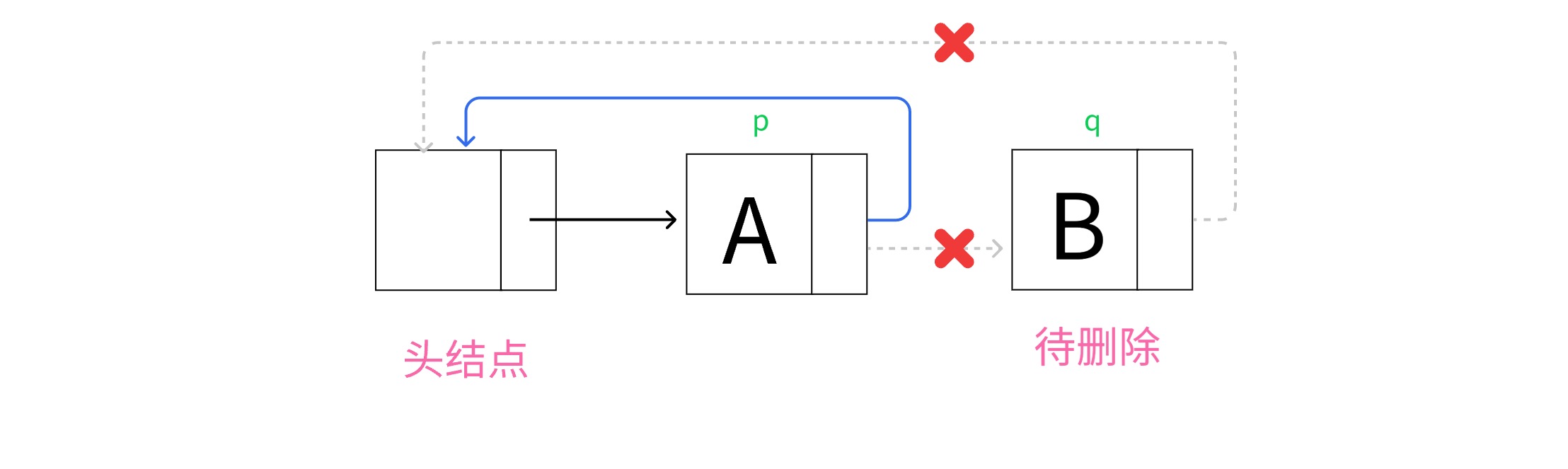
删除尾部结点,更新链表循环
删除中间结点
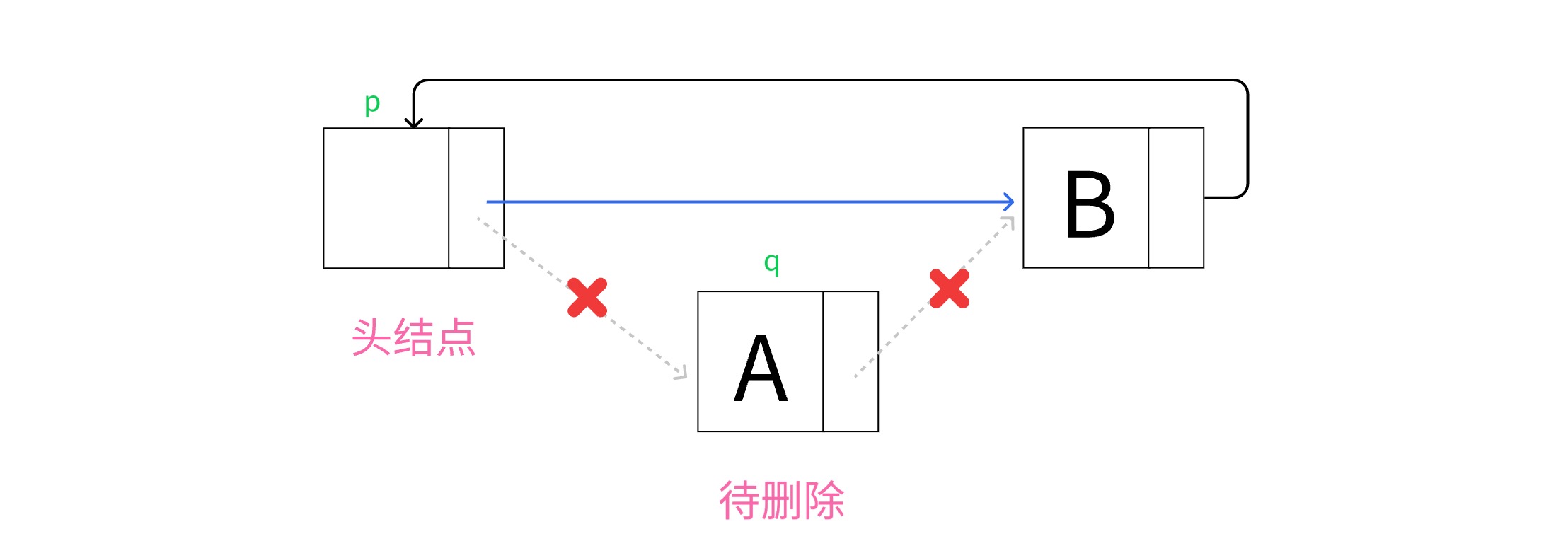
删除中间结点
💡 提示
对于带头结点的链表,上面三种情况都可以统一为同一种操作代码
按位序删除结点 | 可视化完整可视化
2.4 Detailed Explanation of Circular Singly Linked Lists - Linear Lists Tutorial Visualize your code with animations
Understanding Linked Lists: A Complete Guide for Data Structure Learners
Welcome to your comprehensive guide on linked lists, one of the most fundamental data structures in computer science. If you are learning data structures and algorithms, understanding how linked lists work is essential for building a strong foundation. This article will explain the principles, characteristics, and real-world applications of linked lists, and show you how a data structure visualization platform can make learning these concepts much easier.
What is a Linked List?
A linked list is a linear data structure where elements, called nodes, are stored in a sequence. Unlike arrays, which store elements in contiguous memory locations, linked lists use pointers or references to connect each node to the next one. Each node contains two parts: the data itself, and a reference (or link) to the next node in the sequence. The first node is called the head, and the last node points to null, indicating the end of the list.
Think of a linked list like a treasure hunt where each clue tells you where to find the next clue. You start at the first clue (the head), follow the instructions, and move to the next location until you reach the end. This structure gives linked lists unique properties that make them different from arrays and other data structures.
Types of Linked Lists
There are several variations of linked lists, each designed for specific use cases. Understanding these types will help you choose the right one for your programming needs.
Singly Linked List: This is the simplest form. Each node has a single pointer that points to the next node. You can traverse the list in only one direction, from head to tail. This type is memory-efficient but does not allow backward traversal.
Doubly Linked List: In this version, each node contains two pointers: one pointing to the next node and another pointing to the previous node. This allows traversal in both forward and backward directions. While it uses more memory due to the extra pointer, it provides greater flexibility for operations like deletion and insertion.
Circular Linked List: In a circular linked list, the last node points back to the first node instead of null. This creates a circular structure that can be useful for applications requiring continuous looping, such as round-robin scheduling. Circular lists can be either singly or doubly linked.
How Linked Lists Work: Core Operations
To truly understand linked lists, you need to know how basic operations are performed. Here are the key operations every learner should master.
Insertion: Adding a new node to a linked list can happen at the beginning, end, or middle of the list. Insertion at the beginning is very fast because you only need to update the head pointer. Insertion at the end requires traversing the entire list to find the last node, which takes linear time. Insertion in the middle requires finding the correct position and adjusting the pointers of neighboring nodes.
Deletion: Removing a node from a linked list also requires pointer manipulation. To delete a node, you need to update the pointer of the previous node to skip the node being deleted. In a singly linked list, you must traverse from the head to find the node before the one you want to delete. In a doubly linked list, you can directly access the previous node using the backward pointer.
Traversal: To access or search for elements, you must start at the head and follow the pointers one by one. This is called traversal. Unlike arrays, you cannot directly access the nth element of a linked list. You must walk through the list from the beginning, which takes linear time in the worst case.
Searching: Searching for a specific value in a linked list requires traversal. You compare each node's data with the target value until you find a match or reach the end. The time complexity is O(n), where n is the number of nodes in the list.
Advantages and Disadvantages of Linked Lists
Every data structure has its strengths and weaknesses. Knowing these will help you decide when to use a linked list versus other structures like arrays or trees.
Advantages: Linked lists offer dynamic memory allocation, meaning they can grow or shrink during program execution without wasting memory. Insertion and deletion operations are efficient, especially at the beginning of the list, because no shifting of elements is required. Linked lists are ideal for implementing stacks, queues, and other abstract data types.
Disadvantages: Linked lists use extra memory for storing pointers, which can be significant for large lists. Accessing elements is slow because you cannot directly index into a linked list. This makes random access operations inefficient. Additionally, linked lists have poor cache locality compared to arrays, which can impact performance in modern computer architectures.
Real-World Applications of Linked Lists
Linked lists are not just theoretical concepts. They are used in many real-world systems and applications. Understanding these use cases will help you appreciate why linked lists are important.
Undo Functionality in Software: Many applications, such as text editors and image editors, use linked lists to implement undo operations. Each action is stored as a node in a linked list, and you can traverse backward to undo previous actions.
Music Playlists: Music players often use linked lists to manage playlists. Each song is a node, and you can easily add or remove songs, or shuffle the order by rearranging pointers.
Image Galleries: Photo viewing applications use linked lists to navigate through images. Each image is linked to the next and previous ones, allowing smooth forward and backward browsing.
Operating System Task Scheduling: Circular linked lists are used in round-robin scheduling algorithms, where each process gets a fixed time slice, and the scheduler cycles through processes in a circular manner.
Hash Table Collision Resolution: In hash tables, linked lists are often used to handle collisions. When two keys hash to the same index, they are stored in a linked list at that index, allowing multiple entries to coexist.
Polynomial Arithmetic: Linked lists can represent polynomials, where each node stores a coefficient and an exponent. This makes addition and multiplication of polynomials more efficient.
Comparing Linked Lists with Arrays
As a data structures learner, you will frequently compare linked lists with arrays. Here is a clear comparison to help you understand when to use each.
Memory Allocation: Arrays use static memory allocation, meaning their size is fixed at creation. Linked lists use dynamic memory allocation, allowing them to grow and shrink as needed.
Access Time: Arrays provide O(1) random access, meaning you can directly access any element using its index. Linked lists require O(n) time to access an element because you must traverse from the head.
Insertion and Deletion: Arrays require shifting elements when inserting or deleting, which takes O(n) time. Linked lists can insert or delete in O(1) time if you have a reference to the relevant node, but finding that node may take O(n) time.
Memory Overhead: Arrays have no overhead for pointers, making them more memory-efficient for storing simple data. Linked lists require extra memory for pointers, which can double the memory usage for small data types.
Cache Performance: Arrays have excellent cache locality because elements are stored contiguously. Linked lists have poor cache locality because nodes can be scattered across memory, leading to more cache misses.
Common Linked List Problems for Practice
To master linked lists, you should practice solving common problems. Here are some classic problems that appear in coding interviews and algorithm courses.
Reverse a Linked List: This problem asks you to reverse the direction of all pointers so that the tail becomes the new head. It tests your understanding of pointer manipulation and iterative versus recursive approaches.
Detect a Cycle: Determine whether a linked list has a cycle, where a node points back to a previous node. Floyd's cycle detection algorithm, also known as the tortoise and hare algorithm, is the standard solution.
Find the Middle Node: Given a linked list, find the middle node without knowing the length. The slow and fast pointer technique is commonly used here.
Merge Two Sorted Lists: Combine two sorted linked lists into a single sorted list. This problem tests your ability to traverse multiple lists simultaneously and handle edge cases.
Remove Duplicates: Remove duplicate nodes from a sorted linked list. This requires careful pointer manipulation to skip duplicate nodes while maintaining the list structure.
How a Data Structure Visualization Platform Helps You Learn Linked Lists
Learning linked lists through text alone can be challenging because the concepts are inherently visual. Pointer manipulation, node connections, and traversal patterns are much easier to understand when you can see them in action. This is where a data structure visualization platform becomes invaluable.
Visual Representation of Nodes and Pointers: A good visualization platform shows each node as a box with two sections: one for data and one for the pointer. Arrows between nodes clearly show how pointers connect the list. This visual representation helps you understand the physical structure of linked lists in a way that text descriptions cannot.
Step-by-Step Animation of Operations: When you perform an insertion or deletion, the platform animates each step. You can see the new node being created, pointers being redirected, and the list rearranging itself. This makes abstract operations concrete and easier to remember.
Interactive Learning Experience: Instead of just reading about linked lists, you can interact with them directly. You can add nodes, delete nodes, search for values, and see the results instantly. This hands-on approach reinforces learning and helps you develop intuition about how linked lists behave.
Code and Visualization Side by Side: Many platforms show the code that performs each operation alongside the visualization. As you watch the animation, you can see which lines of code correspond to each visual change. This bridges the gap between conceptual understanding and actual implementation.
Error Detection and Debugging: When you make mistakes in your own linked list implementations, a visualization platform can help you debug. You can step through your code and see exactly where pointers go wrong, making it easier to fix bugs and understand why they occurred.
Key Features to Look for in a Visualization Platform
Not all visualization platforms are created equal. When choosing a platform to learn linked lists, look for these important features.
Support for Multiple Linked List Types: The platform should support singly linked lists, doubly linked lists, and circular linked lists. Each type has different pointer structures, and you need to understand all of them.
Customizable Input: You should be able to create your own test cases by specifying the data values and the order of nodes. This allows you to experiment with different scenarios and edge cases.
Speed Control: Being able to control the animation speed is crucial. When you are first learning, you may want slow animations to follow each step carefully. As you become more advanced, you can speed up the animations to review concepts quickly.
Code Integration: The best platforms allow you to write code in popular programming languages like Python, Java, C++, or JavaScript and see the visualization update in real time. This helps you connect theory with practice.
Complexity Analysis Display: Some platforms show the time and space complexity of each operation as you perform it. This helps you understand why certain operations are fast or slow and reinforces your knowledge of algorithm analysis.
How to Use a Visualization Platform Effectively
To get the most out of a data structure visualization platform, follow these learning strategies.
Start with the Basics: Begin by creating a simple linked list with a few nodes. Practice traversing the list and observe how the pointer moves from one node to the next. This builds your foundational understanding.
Perform Operations Manually: Try inserting nodes at different positions and watch how the pointers change. Then try deleting nodes and see how the list reconnects. Doing this manually reinforces the mechanics of each operation.
Compare with Arrays: Use the platform to create both an array and a linked list with the same data. Perform the same operations on both and observe the differences. This will help you internalize the trade-offs between the two data structures.
Trace Algorithms Step by Step: When learning algorithms like reversing a linked list or detecting a cycle, use the platform to trace each step. Watch how the pointers move and how the list transforms. This is much more effective than reading pseudocode.
Test Edge Cases: Use the platform to test edge cases like an empty list, a list with one node, or a list with many nodes. See how your algorithms handle these cases and whether your code breaks. This prepares you for real-world programming challenges.
Implement and Verify: After understanding a concept visually, try implementing it in code. Then run your code through the visualization platform to verify that it works correctly. This cycle of visual understanding followed by coding practice is highly effective.
Common Mistakes Beginners Make with Linked Lists
Understanding common pitfalls will help you avoid them as you learn. Here are mistakes that many students make when first working with linked lists.
Losing the Head Pointer: One of the most common errors is accidentally losing the reference to the head node. If you modify the head pointer without saving it, you may lose access to the entire list. Always be careful when reassigning the head.
Dangling Pointers: When deleting a node, beginners sometimes forget to update the previous node's pointer. This creates a dangling pointer that points to a deleted memory location, causing errors.
Null Pointer Dereference: Trying to access a pointer that is null is a frequent bug. Always check if a node is null before trying to access its data or pointer. This is especially important when traversing lists.
Infinite Loops: In circular linked lists or when implementing algorithms incorrectly, you may create infinite loops. Always ensure that your traversal has a proper termination condition.
Memory Leaks: In languages like C and C++, forgetting to free memory after deleting nodes causes memory leaks. Visualization platforms can help you see when nodes are no longer referenced, reinforcing the importance of memory management.
Advanced Linked List Concepts
Once you have mastered the basics, you can explore more advanced topics that build on linked list fundamentals.
Skip Lists: A skip list is a probabilistic data structure that uses multiple layers of linked lists to allow fast search, insertion, and deletion. It is an alternative to balanced trees and is used in some database systems.
Unrolled Linked Lists: This variation stores multiple elements in each node to improve cache performance. It combines the benefits of arrays and linked lists by reducing pointer overhead while maintaining dynamic sizing.
XOR Linked Lists: In languages that support bitwise operations, XOR linked lists use a single pointer field to store the XOR of the previous and next addresses. This reduces memory usage for doubly linked lists but makes traversal more complex.
Self-Organizing Lists: These are linked lists that reorganize themselves based on access patterns. Frequently accessed nodes are moved to the front to improve average access time. This is used in caching systems.
Why Linked Lists Matter for Algorithm Interviews
If you are preparing for technical interviews, linked lists are a must-know topic. Major tech companies frequently ask linked list problems in their coding interviews. Understanding linked lists demonstrates your ability to work with pointers, manage memory, and think about data structures at a low level.
Interviewers often use linked list problems to test your problem-solving skills and your ability to handle edge cases. Common interview questions include reversing a linked list, detecting cycles, finding intersections, and merging lists. Mastering these problems will give you confidence in your algorithmic abilities.
Getting Started with Our Visualization Platform
Our data structure and algorithm visualization platform is designed specifically for learners like you. It provides an intuitive interface for exploring linked lists and other data structures. Here is how you can start using it to master linked lists today.
Step 1: Access the Platform: Visit our website and navigate to the linked list visualization module. No installation is required, and you can start learning immediately from any device with a web browser.
Step 2: Choose Your List Type: Select whether you want to work with a singly linked list, doubly linked list, or circular linked list. Each type has its own visualization layout that highlights the unique pointer structure.
Step 3: Create Your List: Enter some sample data to create your initial list. You can type numbers, strings, or any other data type you want to practice with. The platform will generate the visual representation instantly.
Step 4: Explore Operations: Use the buttons or menu options to perform insertions, deletions, searches, and traversals. Watch the animation carefully and read the accompanying explanations that describe what is happening at each step.
Step 5: Write and Test Code: Use the built-in code editor to implement linked list operations in your preferred programming language. Run your code and see the visualization update in real time. This immediate feedback loop accelerates your learning.
Step 6: Practice with Challenges: Our platform includes a library of linked list challenges and exercises. Try solving them using the visualization to guide your thinking. Track your progress and revisit challenging concepts as needed.
Conclusion: Master Linked Lists with Visual Learning
Linked lists are a foundational data structure that every computer science student and software developer must understand. They teach you about dynamic memory, pointer manipulation, and the trade-offs between different data structures. While the concepts can be abstract and challenging at first, using a data structure visualization platform makes learning much more accessible and enjoyable.
By seeing nodes and pointers in action, you develop an intuitive understanding that text-based learning alone cannot provide. You can experiment freely, test edge cases, and watch the immediate results of your actions. This hands-on approach builds confidence and prepares you for real-world programming and technical interviews.
Start exploring linked lists on our visualization platform today. Whether you are a beginner just starting your data structures journey or an experienced programmer brushing up on fundamentals, visual learning will help you master linked lists faster and more thoroughly. Remember, the key to understanding linked lists is not just reading about them, but seeing them work and interacting with them directly. Happy learning.