 图码
图码2.2 单链表
💡 有了数组为什么还要链表?
在前面我们介绍过数组,数组中元素是存储在连续的内存位置 在声明数组时,我们可以指定数组的大小,但这将限制数组可以存储的元素数量 例如我们声明的是 int arr[10],那么arr数组最多可以存储10个数据元素 但是我们事先不知道元素的大小呢? 我们该如何去做?
当然首先想到的是申请一个足够大的数组,但是内存中可能会没有足够大的连续内存空间
那么我们能不能设计一种数据结构,合理的利用内存的中的非连续空间呢?
链表是一种非常灵活的动态数据结构,也是一种线性表。但是并不会按线性的顺序存储数据,而是在每一个节点里存入到下一个节点的指针。链表是由数据域和指针域两部分组成的,它的组成结构如下:链表不会将其元素存储在连续的内存位置中,所以我们可以任意添加链表元素的数量。
单链表
线性表的链式存储也被称为单链表,是一种常见的数据结构,由一系列节点组成。
每个节点包含两部分:数据和指向下一个节点的指针。单链表的特点是节点之间通过指针相连,形成一个线性结构。
- data:数据域,也是节点的值
- next:指针域,指向下一个结点的指针
- 1
- 2
- 3
- 4
- 5
- 6
- 7
- 8
typedef struct LNode {
int data; // 数据域
struct LNode * next; // 指针域
} LNode, *LinkLis
// 完整代码:https://totuma.cn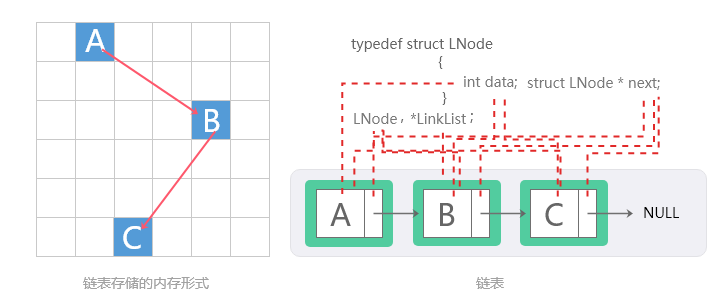
链表结构
💡之所以称为单链表,并不是指它是只有一个链表结点组成,是为了明确它是“单向的”,即每个节点只包含一个指向下一个结点的指针。 这与后面要讲的双向链表不同,所以也可以把单链表称为单向链表。
单链表和数组都是常见的数据结构,各有优缺点。
单链表的节点在需要时动态分配内存,这意味着不需要像数组那样在创建时预先分配一大片连续内存。因此,单链表在内存使用上更加灵活,可以有效应对内存碎片和动态增长的问题。
由于链表节点是在需要时分配的,可以避免数组因初始化大小不确定而造成的内存浪费。例如,如果数组大小初始化过大,未使用的部分将浪费内存;若初始化过小,则可能需要频繁重新分配和复制。
每个节点需要一个指针域来存储对下一个节点的引用,这意味着相比于数组,单链表在每个节点上都会有额外的内存开销。对于存储小数据的场景,这个开销相对较大,可能导致内存利用率下降。
链表中的一些概念
头结点
在单链表的开始结点之前设立一个节点称之为头结点(也称为哨兵节点或哑节点),头结点的数据域可以不存储任何信息,也可以存储链表的长度等附加信息,头结点的指针域存储指向第一个结点(首元结点)的指针。
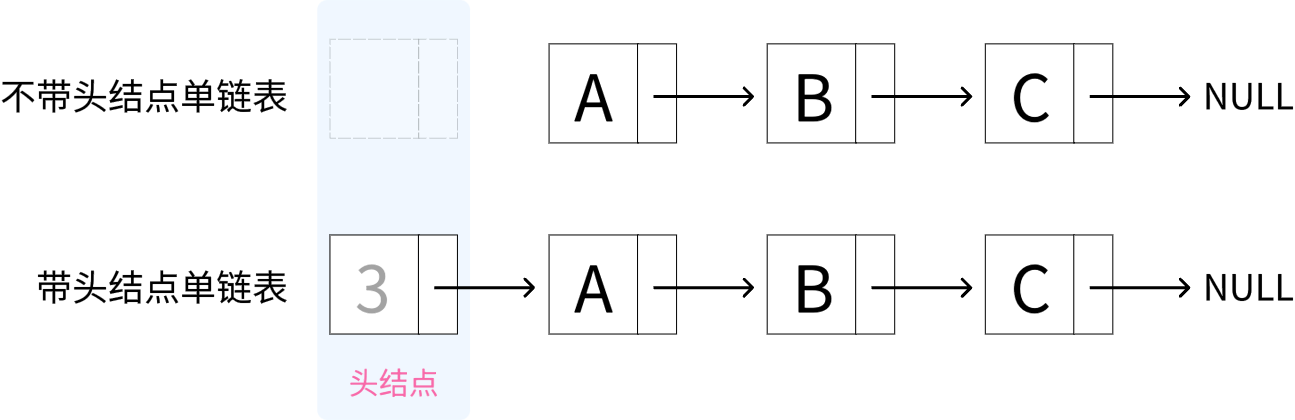
带头和不带头结点区别
头指针
头指针是指链表中,指向第一个结点的指针。
头指针具有标识作用,所以常常会用头指针冠以链表的名字。所以你定义一个链表,那么链表的名字一般就是这个链表的头指针。
ListNode L = new ListNode(0); 左边的是指针和结点
无论链表是否为空,头指针均不为空,头指针是链表的必要元素。
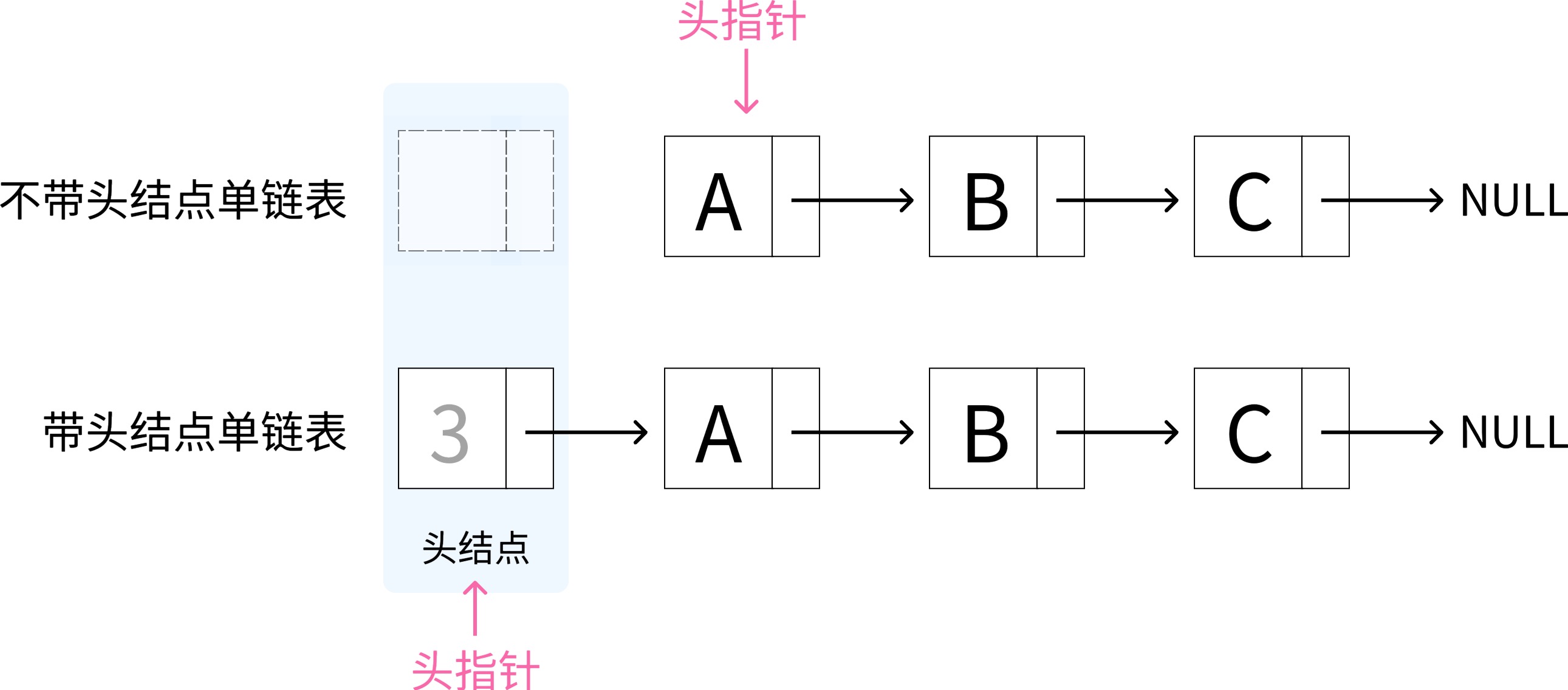
带头和不带头结点区别
首元结点
链表中第一个元素所在的结点,它是头结点后边的第一个结点。如果是带头结点的链表,则头结点后面的为首元结点。
元素是指链表中实际存储数据的结点,像头结点就不属于元素,因为它存储的不是数据,而是一些链表的属性信息(链表长度)或者为空。
带头和不带头结点区别
💡 整理成一句话就是
- 头指针:指向第一个结点
- 头结点:在首元结点前面设立一个结点
- 首元结点:链表中第一个元素所在的结点
- 元素结点:存储链表实际信息的结点
带头结点和不带头结点的区别
在带头结点的链表中,链表的第一个节点是一个特殊的节点,称为头节点,它不存储数据(或存储链表长度),仅用于简化链表的操作。
引入头结点后的优点
- 插入操作:在插入新节点时,无论插入位置是链表头部、中间还是尾部,处理逻辑一致,无需特别处理第一个节点。
- 删除操作:在删除节点时,无论删除的是第一个节点还是其他节点,处理逻辑一致,无需特别处理第一个节点。
- 判空操作: 空链表和非空链表的处理逻辑一致,因为头节点始终存在。
带头和不带头结点的链表在遍历方面处理逻辑无大差别。
带头结点的单链表代码实现
共6种函数代码
- 头插法创建链表
- 尾插法创建链表
- 按值查找结点
- 按位序插入结点
- 按位序删除结点
头插法创建链表
该代码通过头插法创建一个链表。 头插法的特点是每插入一个新节点,链表的头节点就会变成新插入的节点,从而使得输入的数据在链表中是倒序存储的。 当输入数据为 999 时,创建链表的循环结束,函数返回最终的链表头节点。
头插法创建单链表 | 可视化完整可视化
2.2 Detailed Explanation of Singly Linked Lists - Linear Lists Tutorial Visualize your code with animations

Understanding Linked Lists: A Beginner-Friendly Guide to Linear Data Structures
When you start learning data structures and algorithms, one of the first concepts you will encounter is the linked list. Unlike arrays, which store elements in a continuous block of memory, a linked list is a linear data structure where each element, called a node, contains a data field and a reference (or pointer) to the next node in the sequence. This fundamental difference gives linked lists unique properties that make them ideal for specific use cases. In this article, we will explore the principles, characteristics, practical applications, and how a data structure visualization platform can help you master this topic.
What Is a Linked List? The Core Principle
A linked list is a sequence of nodes. Each node holds two pieces of information: the actual data (which can be any type, such as an integer, string, or object) and a pointer to the next node. The first node is called the head, and the last node points to null (or None in Python), indicating the end of the list. Because nodes are not stored in contiguous memory locations, the linked list can grow or shrink dynamically without the need to pre-allocate memory. This is one of its biggest advantages over static arrays.
There are several types of linked lists: singly linked lists (each node points only to the next node), doubly linked lists (each node points to both the next and the previous node), and circular linked lists (the last node points back to the head). Each variant has its own strengths, which we will discuss later.
How Does a Linked List Work? A Step-by-Step Explanation
Imagine you have a train. Each car (node) is connected to the next car by a coupling (pointer). If you want to add a new car in the middle, you simply disconnect the coupling between two cars, insert the new car, and reconnect. You do not need to move the entire train. This is exactly how insertion works in a linked list. Similarly, if you want to remove a car, you just bypass it by connecting the previous car directly to the next one. This makes insertion and deletion operations very fast, especially when compared to arrays, where shifting elements can be costly.
However, there is a trade-off. To find a specific element in a linked list, you must start from the head and follow the pointers one by one until you reach the desired node. This is called sequential access, and it has a time complexity of O(n). In contrast, arrays support random access, allowing you to jump directly to any index in O(1) time. So, linked lists are not ideal for scenarios where you frequently need to search for elements by index.
Key Characteristics of Linked Lists
Linked lists have several defining features that every learner should understand:
Dynamic Size: Unlike arrays, linked lists can grow or shrink at runtime. You do not need to specify the size in advance. This makes them very flexible for applications where the number of elements is unknown or changes frequently.
Efficient Insertions and Deletions: Inserting or deleting a node at the beginning or middle of a linked list is extremely efficient. You only need to update a few pointers. In an array, you would need to shift all subsequent elements, which takes O(n) time.
No Memory Waste: Because nodes are allocated one by one as needed, there is no wasted memory (unlike arrays that may reserve extra space). However, each node requires extra memory for the pointer(s), which can be a disadvantage for small data types.
Sequential Access: As mentioned, you cannot access a node by index directly. You must traverse the list from the head. This makes search operations slower than in arrays.
Common Applications of Linked Lists in the Real World
Linked lists are not just a theoretical concept. They are used in many real-world systems and software. Here are some of the most common applications:
1. Implementing Stacks and Queues: Linked lists provide an excellent foundation for building stacks (LIFO) and queues (FIFO). For example, a queue can be implemented using a linked list where enqueue adds a node at the tail and dequeue removes a node from the head. Both operations are O(1).
2. Music Playlists: Consider a music player with a playlist. Each song is a node, and the "next" pointer points to the next song. A circular linked list can be used to loop the playlist endlessly. Inserting a new song between two existing songs is as simple as updating a few pointers.
3. Image Viewer: In an image viewer application, you can navigate through images using a doubly linked list. Each image node has a "previous" and "next" pointer, allowing you to go forward or backward easily.
4. Undo Functionality in Software: Many applications, like text editors or graphic design tools, use a linked list to implement the undo feature. Each state of the document is stored as a node. When you click "undo," the application moves to the previous node. A doubly linked list is particularly useful here because you can also implement "redo."
5. Memory Management: Operating systems use linked lists to manage free memory blocks. When a program requests memory, the OS searches the free list for a suitable block. When memory is freed, it is added back to the list.
6. Polynomial Representation: In computer algebra systems, polynomials can be represented using linked lists. Each node stores a coefficient and an exponent, and the list is sorted by exponent. This makes addition and multiplication of polynomials efficient.
Singly Linked List vs. Doubly Linked List vs. Circular Linked List
Choosing the right type of linked list depends on your specific needs. Let us compare them:
Singly Linked List: Each node has one pointer pointing to the next node. It is simple and uses less memory. However, you can only traverse in one direction (forward). It is ideal for applications where you only need forward traversal, such as a simple queue or a stack.
Doubly Linked List: Each node has two pointers: one to the next node and one to the previous node. This allows bidirectional traversal. You can insert or delete nodes more easily because you have access to the previous node. However, it uses more memory (two pointers per node). It is commonly used in applications like image viewers or undo/redo systems.
Circular Linked List: The last node points back to the first node (or the head). In a doubly circular linked list, the head also points to the tail. This structure is useful for applications that require looping, such as round-robin scheduling in operating systems or repeating playlists.
Time and Space Complexity: What You Need to Know
Understanding complexity is crucial for choosing the right data structure. Here is a quick summary for singly linked lists:
Access by index: O(n) - You must traverse from the head.
Search for a value: O(n) - In the worst case, you visit every node.
Insertion at the beginning: O(1) - Just update the head pointer.
Insertion at the end: O(n) - You need to traverse to the last node (unless you maintain a tail pointer).
Insertion in the middle: O(1) if you have a reference to the node before the insertion point.
Deletion at the beginning: O(1) - Just update the head pointer.
Deletion at the end: O(n) - You need to find the second-to-last node.
Space complexity: O(n) - Each node stores data plus one pointer.
For doubly linked lists, deletion at the end is O(1) because you have a pointer to the previous node. However, the space complexity is higher because of the extra pointer.
Common Pitfalls and How to Avoid Them
When learning linked lists, beginners often make a few common mistakes. Knowing these will help you debug your code faster:
1. Losing the Head Pointer: When inserting or deleting at the beginning, always remember to update the head pointer. If you lose it, you lose the entire list.
2. Dereferencing Null Pointers: Before accessing a node's data or next pointer, always check if the node is null. This is especially important when traversing or deleting.
3. Memory Leaks (in languages like C/C++): When deleting a node, remember to free its memory. In languages with garbage collection (like Java or Python), this is handled automatically, but it is still good practice to remove references.
4. Infinite Loops in Circular Lists: When traversing a circular linked list, you must have a stopping condition (e.g., after visiting the head again) to avoid an infinite loop.
How to Master Linked Lists Using a Data Structure Visualization Platform
Learning linked lists by reading text or watching static diagrams can be challenging. This is where a data structure visualization platform becomes an invaluable tool. These platforms allow you to see exactly how nodes and pointers change in real time as you perform operations. Here is how you can use such a platform to accelerate your learning:
1. Visualize Node Connections: Instead of imagining pointers in your head, you can see them. Each node is drawn as a box with arrows pointing to the next node. When you insert or delete, the arrows update instantly. This makes the abstract concept of "pointers" concrete and easy to understand.
2. Step-by-Step Execution: Most visualization platforms allow you to step through your code line by line. You can see exactly what happens when you create a new node, update a pointer, or traverse the list. This is especially helpful for understanding complex operations like reversing a linked list or detecting cycles.
3. Interactive Practice: You can manually perform operations like insertion, deletion, and search by clicking buttons or dragging nodes. The platform will show you the resulting state of the list. This hands-on practice reinforces your understanding much better than passive reading.
4. Compare Different Types: You can switch between singly, doubly, and circular linked lists to see how the structure changes. For example, you can see how a doubly linked list has two arrows per node, making backward traversal possible. This visual comparison helps you internalize the trade-offs.
5. Debug Your Code: If you are writing your own linked list implementation, you can paste your code into the platform and run it. The visualization will show you if your pointers are correct. This is a powerful debugging tool that can save you hours of frustration.
6. Understand Time Complexity: Some advanced platforms can even show you the number of operations performed (e.g., how many nodes were visited). This helps you connect the visual process with the theoretical time complexity.
Why Use a Visualization Platform for Learning Data Structures?
Traditional learning methods often rely on static images or text descriptions. While these can be helpful, they have limitations. A visualization platform offers several key advantages:
Active Learning: You are not just reading; you are interacting. This engages your brain more deeply and improves retention.
Immediate Feedback: When you make a mistake, you see it immediately. The list might break or point to the wrong node. This instant feedback helps you correct your mental model.
Abstract to Concrete: Pointers, references, and memory allocation are abstract concepts. Visualization makes them concrete by showing you the actual connections.
Self-Paced: You can pause, rewind, and replay operations as many times as you need. This is especially useful for complex algorithms like reversing a linked list in place.
Comprehensive Coverage: Good platforms cover not just linked lists but also other data structures like trees, graphs, hash tables, and sorting algorithms. This allows you to build a complete understanding of data structures and algorithms.
Practical Tips for Using a Visualization Platform Effectively
To get the most out of a data structure visualization platform, follow these tips:
1. Start with the Basics: Before diving into complex operations, make sure you understand the fundamental structure. Create a simple singly linked list with three nodes and see how they are connected.
2. Perform Operations Manually: Do not just watch the animations. Use the platform's interactive features to insert, delete, and search. Try to predict what will happen before you click.
3. Code Along: Open your code editor and try to implement the same operations you are visualizing. This bridges the gap between theory and practice.
4. Challenge Yourself: Once you are comfortable, try to solve problems like "reverse the linked list" or "detect a cycle" using the visualization. Then, check your solution against the platform's output.
5. Review and Repeat: Data structures take time to master. Come back to the platform periodically to refresh your knowledge or explore more advanced topics like skip lists or self-balancing trees.
Conclusion: Linked Lists Are a Gateway to Advanced Data Structures
Linked lists are one of the most important foundational data structures in computer science. They teach you essential concepts like dynamic memory allocation, pointers, and the trade-offs between different data structures. Mastering linked lists will make it much easier to learn more complex structures like trees, graphs, and hash tables, which often use similar pointer-based techniques.
Remember, the key to mastering linked lists is practice. Use a data structure visualization platform to see the pointers in action, experiment with different operations, and build your intuition. With time and effort, you will be able to implement and manipulate linked lists with confidence. Whether you are preparing for coding interviews, working on a personal project, or studying for a computer science exam, a solid understanding of linked lists is an invaluable asset.
Start your journey today. Open a visualization platform, create your first node, and watch the magic of pointers unfold. Happy coding!
尾插法创建链表
该代码通过尾插法创建一个链表。 尾插法的特点是每插入一个新节点,链表的尾节点指针(pTail)会更新为新插入的节点,使其始终指向当前链表的尾结点。从而使得输入的数据在链表中按顺序存储。 当输入数据为 999 时,循环结束,将尾节点的 next 指针置为 NULL 表示链表结束,函数返回最终的链表头节点。
尾插法创建单链表 | 可视化完整可视化
2.2 Detailed Explanation of Singly Linked Lists - Linear Lists Tutorial Visualize your code with animations
Understanding Linked Lists: A Beginner-Friendly Guide to Linear Data Structures
When you start learning data structures and algorithms, one of the first concepts you will encounter is the linked list. Unlike arrays, which store elements in a continuous block of memory, a linked list is a linear data structure where each element, called a node, contains a data field and a reference (or pointer) to the next node in the sequence. This fundamental difference gives linked lists unique properties that make them ideal for specific use cases. In this article, we will explore the principles, characteristics, practical applications, and how a data structure visualization platform can help you master this topic.
What Is a Linked List? The Core Principle
A linked list is a sequence of nodes. Each node holds two pieces of information: the actual data (which can be any type, such as an integer, string, or object) and a pointer to the next node. The first node is called the head, and the last node points to null (or None in Python), indicating the end of the list. Because nodes are not stored in contiguous memory locations, the linked list can grow or shrink dynamically without the need to pre-allocate memory. This is one of its biggest advantages over static arrays.
There are several types of linked lists: singly linked lists (each node points only to the next node), doubly linked lists (each node points to both the next and the previous node), and circular linked lists (the last node points back to the head). Each variant has its own strengths, which we will discuss later.
How Does a Linked List Work? A Step-by-Step Explanation
Imagine you have a train. Each car (node) is connected to the next car by a coupling (pointer). If you want to add a new car in the middle, you simply disconnect the coupling between two cars, insert the new car, and reconnect. You do not need to move the entire train. This is exactly how insertion works in a linked list. Similarly, if you want to remove a car, you just bypass it by connecting the previous car directly to the next one. This makes insertion and deletion operations very fast, especially when compared to arrays, where shifting elements can be costly.
However, there is a trade-off. To find a specific element in a linked list, you must start from the head and follow the pointers one by one until you reach the desired node. This is called sequential access, and it has a time complexity of O(n). In contrast, arrays support random access, allowing you to jump directly to any index in O(1) time. So, linked lists are not ideal for scenarios where you frequently need to search for elements by index.
Key Characteristics of Linked Lists
Linked lists have several defining features that every learner should understand:
Dynamic Size: Unlike arrays, linked lists can grow or shrink at runtime. You do not need to specify the size in advance. This makes them very flexible for applications where the number of elements is unknown or changes frequently.
Efficient Insertions and Deletions: Inserting or deleting a node at the beginning or middle of a linked list is extremely efficient. You only need to update a few pointers. In an array, you would need to shift all subsequent elements, which takes O(n) time.
No Memory Waste: Because nodes are allocated one by one as needed, there is no wasted memory (unlike arrays that may reserve extra space). However, each node requires extra memory for the pointer(s), which can be a disadvantage for small data types.
Sequential Access: As mentioned, you cannot access a node by index directly. You must traverse the list from the head. This makes search operations slower than in arrays.
Common Applications of Linked Lists in the Real World
Linked lists are not just a theoretical concept. They are used in many real-world systems and software. Here are some of the most common applications:
1. Implementing Stacks and Queues: Linked lists provide an excellent foundation for building stacks (LIFO) and queues (FIFO). For example, a queue can be implemented using a linked list where enqueue adds a node at the tail and dequeue removes a node from the head. Both operations are O(1).
2. Music Playlists: Consider a music player with a playlist. Each song is a node, and the "next" pointer points to the next song. A circular linked list can be used to loop the playlist endlessly. Inserting a new song between two existing songs is as simple as updating a few pointers.
3. Image Viewer: In an image viewer application, you can navigate through images using a doubly linked list. Each image node has a "previous" and "next" pointer, allowing you to go forward or backward easily.
4. Undo Functionality in Software: Many applications, like text editors or graphic design tools, use a linked list to implement the undo feature. Each state of the document is stored as a node. When you click "undo," the application moves to the previous node. A doubly linked list is particularly useful here because you can also implement "redo."
5. Memory Management: Operating systems use linked lists to manage free memory blocks. When a program requests memory, the OS searches the free list for a suitable block. When memory is freed, it is added back to the list.
6. Polynomial Representation: In computer algebra systems, polynomials can be represented using linked lists. Each node stores a coefficient and an exponent, and the list is sorted by exponent. This makes addition and multiplication of polynomials efficient.
Singly Linked List vs. Doubly Linked List vs. Circular Linked List
Choosing the right type of linked list depends on your specific needs. Let us compare them:
Singly Linked List: Each node has one pointer pointing to the next node. It is simple and uses less memory. However, you can only traverse in one direction (forward). It is ideal for applications where you only need forward traversal, such as a simple queue or a stack.
Doubly Linked List: Each node has two pointers: one to the next node and one to the previous node. This allows bidirectional traversal. You can insert or delete nodes more easily because you have access to the previous node. However, it uses more memory (two pointers per node). It is commonly used in applications like image viewers or undo/redo systems.
Circular Linked List: The last node points back to the first node (or the head). In a doubly circular linked list, the head also points to the tail. This structure is useful for applications that require looping, such as round-robin scheduling in operating systems or repeating playlists.
Time and Space Complexity: What You Need to Know
Understanding complexity is crucial for choosing the right data structure. Here is a quick summary for singly linked lists:
Access by index: O(n) - You must traverse from the head.
Search for a value: O(n) - In the worst case, you visit every node.
Insertion at the beginning: O(1) - Just update the head pointer.
Insertion at the end: O(n) - You need to traverse to the last node (unless you maintain a tail pointer).
Insertion in the middle: O(1) if you have a reference to the node before the insertion point.
Deletion at the beginning: O(1) - Just update the head pointer.
Deletion at the end: O(n) - You need to find the second-to-last node.
Space complexity: O(n) - Each node stores data plus one pointer.
For doubly linked lists, deletion at the end is O(1) because you have a pointer to the previous node. However, the space complexity is higher because of the extra pointer.
Common Pitfalls and How to Avoid Them
When learning linked lists, beginners often make a few common mistakes. Knowing these will help you debug your code faster:
1. Losing the Head Pointer: When inserting or deleting at the beginning, always remember to update the head pointer. If you lose it, you lose the entire list.
2. Dereferencing Null Pointers: Before accessing a node's data or next pointer, always check if the node is null. This is especially important when traversing or deleting.
3. Memory Leaks (in languages like C/C++): When deleting a node, remember to free its memory. In languages with garbage collection (like Java or Python), this is handled automatically, but it is still good practice to remove references.
4. Infinite Loops in Circular Lists: When traversing a circular linked list, you must have a stopping condition (e.g., after visiting the head again) to avoid an infinite loop.
How to Master Linked Lists Using a Data Structure Visualization Platform
Learning linked lists by reading text or watching static diagrams can be challenging. This is where a data structure visualization platform becomes an invaluable tool. These platforms allow you to see exactly how nodes and pointers change in real time as you perform operations. Here is how you can use such a platform to accelerate your learning:
1. Visualize Node Connections: Instead of imagining pointers in your head, you can see them. Each node is drawn as a box with arrows pointing to the next node. When you insert or delete, the arrows update instantly. This makes the abstract concept of "pointers" concrete and easy to understand.
2. Step-by-Step Execution: Most visualization platforms allow you to step through your code line by line. You can see exactly what happens when you create a new node, update a pointer, or traverse the list. This is especially helpful for understanding complex operations like reversing a linked list or detecting cycles.
3. Interactive Practice: You can manually perform operations like insertion, deletion, and search by clicking buttons or dragging nodes. The platform will show you the resulting state of the list. This hands-on practice reinforces your understanding much better than passive reading.
4. Compare Different Types: You can switch between singly, doubly, and circular linked lists to see how the structure changes. For example, you can see how a doubly linked list has two arrows per node, making backward traversal possible. This visual comparison helps you internalize the trade-offs.
5. Debug Your Code: If you are writing your own linked list implementation, you can paste your code into the platform and run it. The visualization will show you if your pointers are correct. This is a powerful debugging tool that can save you hours of frustration.
6. Understand Time Complexity: Some advanced platforms can even show you the number of operations performed (e.g., how many nodes were visited). This helps you connect the visual process with the theoretical time complexity.
Why Use a Visualization Platform for Learning Data Structures?
Traditional learning methods often rely on static images or text descriptions. While these can be helpful, they have limitations. A visualization platform offers several key advantages:
Active Learning: You are not just reading; you are interacting. This engages your brain more deeply and improves retention.
Immediate Feedback: When you make a mistake, you see it immediately. The list might break or point to the wrong node. This instant feedback helps you correct your mental model.
Abstract to Concrete: Pointers, references, and memory allocation are abstract concepts. Visualization makes them concrete by showing you the actual connections.
Self-Paced: You can pause, rewind, and replay operations as many times as you need. This is especially useful for complex algorithms like reversing a linked list in place.
Comprehensive Coverage: Good platforms cover not just linked lists but also other data structures like trees, graphs, hash tables, and sorting algorithms. This allows you to build a complete understanding of data structures and algorithms.
Practical Tips for Using a Visualization Platform Effectively
To get the most out of a data structure visualization platform, follow these tips:
1. Start with the Basics: Before diving into complex operations, make sure you understand the fundamental structure. Create a simple singly linked list with three nodes and see how they are connected.
2. Perform Operations Manually: Do not just watch the animations. Use the platform's interactive features to insert, delete, and search. Try to predict what will happen before you click.
3. Code Along: Open your code editor and try to implement the same operations you are visualizing. This bridges the gap between theory and practice.
4. Challenge Yourself: Once you are comfortable, try to solve problems like "reverse the linked list" or "detect a cycle" using the visualization. Then, check your solution against the platform's output.
5. Review and Repeat: Data structures take time to master. Come back to the platform periodically to refresh your knowledge or explore more advanced topics like skip lists or self-balancing trees.
Conclusion: Linked Lists Are a Gateway to Advanced Data Structures
Linked lists are one of the most important foundational data structures in computer science. They teach you essential concepts like dynamic memory allocation, pointers, and the trade-offs between different data structures. Mastering linked lists will make it much easier to learn more complex structures like trees, graphs, and hash tables, which often use similar pointer-based techniques.
Remember, the key to mastering linked lists is practice. Use a data structure visualization platform to see the pointers in action, experiment with different operations, and build your intuition. With time and effort, you will be able to implement and manipulate linked lists with confidence. Whether you are preparing for coding interviews, working on a personal project, or studying for a computer science exam, a solid understanding of linked lists is an invaluable asset.
Start your journey today. Open a visualization platform, create your first node, and watch the magic of pointers unfold. Happy coding!
按值查找结点
该代码实现了通过值查找链表节点的功能。 它从链表的第一个数据节点开始遍历,查找具有指定值的节点,并返回该节点及其位序。如果未找到该值,则返回NULL。
💡 注意
注意位序和索引(下标)的区别,还不了解的话可以查看上一章节的数组实现。
带头结点的链表值从头结点后面开始,所以 i 初始化为 1 ,则表示从链表的第一个数据节点开始。
按位序查找结点 | 可视化完整可视化
2.2 Detailed Explanation of Singly Linked Lists - Linear Lists Tutorial Visualize your code with animations
Understanding Linked Lists: A Beginner-Friendly Guide to Linear Data Structures
When you start learning data structures and algorithms, one of the first concepts you will encounter is the linked list. Unlike arrays, which store elements in a continuous block of memory, a linked list is a linear data structure where each element, called a node, contains a data field and a reference (or pointer) to the next node in the sequence. This fundamental difference gives linked lists unique properties that make them ideal for specific use cases. In this article, we will explore the principles, characteristics, practical applications, and how a data structure visualization platform can help you master this topic.
What Is a Linked List? The Core Principle
A linked list is a sequence of nodes. Each node holds two pieces of information: the actual data (which can be any type, such as an integer, string, or object) and a pointer to the next node. The first node is called the head, and the last node points to null (or None in Python), indicating the end of the list. Because nodes are not stored in contiguous memory locations, the linked list can grow or shrink dynamically without the need to pre-allocate memory. This is one of its biggest advantages over static arrays.
There are several types of linked lists: singly linked lists (each node points only to the next node), doubly linked lists (each node points to both the next and the previous node), and circular linked lists (the last node points back to the head). Each variant has its own strengths, which we will discuss later.
How Does a Linked List Work? A Step-by-Step Explanation
Imagine you have a train. Each car (node) is connected to the next car by a coupling (pointer). If you want to add a new car in the middle, you simply disconnect the coupling between two cars, insert the new car, and reconnect. You do not need to move the entire train. This is exactly how insertion works in a linked list. Similarly, if you want to remove a car, you just bypass it by connecting the previous car directly to the next one. This makes insertion and deletion operations very fast, especially when compared to arrays, where shifting elements can be costly.
However, there is a trade-off. To find a specific element in a linked list, you must start from the head and follow the pointers one by one until you reach the desired node. This is called sequential access, and it has a time complexity of O(n). In contrast, arrays support random access, allowing you to jump directly to any index in O(1) time. So, linked lists are not ideal for scenarios where you frequently need to search for elements by index.
Key Characteristics of Linked Lists
Linked lists have several defining features that every learner should understand:
Dynamic Size: Unlike arrays, linked lists can grow or shrink at runtime. You do not need to specify the size in advance. This makes them very flexible for applications where the number of elements is unknown or changes frequently.
Efficient Insertions and Deletions: Inserting or deleting a node at the beginning or middle of a linked list is extremely efficient. You only need to update a few pointers. In an array, you would need to shift all subsequent elements, which takes O(n) time.
No Memory Waste: Because nodes are allocated one by one as needed, there is no wasted memory (unlike arrays that may reserve extra space). However, each node requires extra memory for the pointer(s), which can be a disadvantage for small data types.
Sequential Access: As mentioned, you cannot access a node by index directly. You must traverse the list from the head. This makes search operations slower than in arrays.
Common Applications of Linked Lists in the Real World
Linked lists are not just a theoretical concept. They are used in many real-world systems and software. Here are some of the most common applications:
1. Implementing Stacks and Queues: Linked lists provide an excellent foundation for building stacks (LIFO) and queues (FIFO). For example, a queue can be implemented using a linked list where enqueue adds a node at the tail and dequeue removes a node from the head. Both operations are O(1).
2. Music Playlists: Consider a music player with a playlist. Each song is a node, and the "next" pointer points to the next song. A circular linked list can be used to loop the playlist endlessly. Inserting a new song between two existing songs is as simple as updating a few pointers.
3. Image Viewer: In an image viewer application, you can navigate through images using a doubly linked list. Each image node has a "previous" and "next" pointer, allowing you to go forward or backward easily.
4. Undo Functionality in Software: Many applications, like text editors or graphic design tools, use a linked list to implement the undo feature. Each state of the document is stored as a node. When you click "undo," the application moves to the previous node. A doubly linked list is particularly useful here because you can also implement "redo."
5. Memory Management: Operating systems use linked lists to manage free memory blocks. When a program requests memory, the OS searches the free list for a suitable block. When memory is freed, it is added back to the list.
6. Polynomial Representation: In computer algebra systems, polynomials can be represented using linked lists. Each node stores a coefficient and an exponent, and the list is sorted by exponent. This makes addition and multiplication of polynomials efficient.
Singly Linked List vs. Doubly Linked List vs. Circular Linked List
Choosing the right type of linked list depends on your specific needs. Let us compare them:
Singly Linked List: Each node has one pointer pointing to the next node. It is simple and uses less memory. However, you can only traverse in one direction (forward). It is ideal for applications where you only need forward traversal, such as a simple queue or a stack.
Doubly Linked List: Each node has two pointers: one to the next node and one to the previous node. This allows bidirectional traversal. You can insert or delete nodes more easily because you have access to the previous node. However, it uses more memory (two pointers per node). It is commonly used in applications like image viewers or undo/redo systems.
Circular Linked List: The last node points back to the first node (or the head). In a doubly circular linked list, the head also points to the tail. This structure is useful for applications that require looping, such as round-robin scheduling in operating systems or repeating playlists.
Time and Space Complexity: What You Need to Know
Understanding complexity is crucial for choosing the right data structure. Here is a quick summary for singly linked lists:
Access by index: O(n) - You must traverse from the head.
Search for a value: O(n) - In the worst case, you visit every node.
Insertion at the beginning: O(1) - Just update the head pointer.
Insertion at the end: O(n) - You need to traverse to the last node (unless you maintain a tail pointer).
Insertion in the middle: O(1) if you have a reference to the node before the insertion point.
Deletion at the beginning: O(1) - Just update the head pointer.
Deletion at the end: O(n) - You need to find the second-to-last node.
Space complexity: O(n) - Each node stores data plus one pointer.
For doubly linked lists, deletion at the end is O(1) because you have a pointer to the previous node. However, the space complexity is higher because of the extra pointer.
Common Pitfalls and How to Avoid Them
When learning linked lists, beginners often make a few common mistakes. Knowing these will help you debug your code faster:
1. Losing the Head Pointer: When inserting or deleting at the beginning, always remember to update the head pointer. If you lose it, you lose the entire list.
2. Dereferencing Null Pointers: Before accessing a node's data or next pointer, always check if the node is null. This is especially important when traversing or deleting.
3. Memory Leaks (in languages like C/C++): When deleting a node, remember to free its memory. In languages with garbage collection (like Java or Python), this is handled automatically, but it is still good practice to remove references.
4. Infinite Loops in Circular Lists: When traversing a circular linked list, you must have a stopping condition (e.g., after visiting the head again) to avoid an infinite loop.
How to Master Linked Lists Using a Data Structure Visualization Platform
Learning linked lists by reading text or watching static diagrams can be challenging. This is where a data structure visualization platform becomes an invaluable tool. These platforms allow you to see exactly how nodes and pointers change in real time as you perform operations. Here is how you can use such a platform to accelerate your learning:
1. Visualize Node Connections: Instead of imagining pointers in your head, you can see them. Each node is drawn as a box with arrows pointing to the next node. When you insert or delete, the arrows update instantly. This makes the abstract concept of "pointers" concrete and easy to understand.
2. Step-by-Step Execution: Most visualization platforms allow you to step through your code line by line. You can see exactly what happens when you create a new node, update a pointer, or traverse the list. This is especially helpful for understanding complex operations like reversing a linked list or detecting cycles.
3. Interactive Practice: You can manually perform operations like insertion, deletion, and search by clicking buttons or dragging nodes. The platform will show you the resulting state of the list. This hands-on practice reinforces your understanding much better than passive reading.
4. Compare Different Types: You can switch between singly, doubly, and circular linked lists to see how the structure changes. For example, you can see how a doubly linked list has two arrows per node, making backward traversal possible. This visual comparison helps you internalize the trade-offs.
5. Debug Your Code: If you are writing your own linked list implementation, you can paste your code into the platform and run it. The visualization will show you if your pointers are correct. This is a powerful debugging tool that can save you hours of frustration.
6. Understand Time Complexity: Some advanced platforms can even show you the number of operations performed (e.g., how many nodes were visited). This helps you connect the visual process with the theoretical time complexity.
Why Use a Visualization Platform for Learning Data Structures?
Traditional learning methods often rely on static images or text descriptions. While these can be helpful, they have limitations. A visualization platform offers several key advantages:
Active Learning: You are not just reading; you are interacting. This engages your brain more deeply and improves retention.
Immediate Feedback: When you make a mistake, you see it immediately. The list might break or point to the wrong node. This instant feedback helps you correct your mental model.
Abstract to Concrete: Pointers, references, and memory allocation are abstract concepts. Visualization makes them concrete by showing you the actual connections.
Self-Paced: You can pause, rewind, and replay operations as many times as you need. This is especially useful for complex algorithms like reversing a linked list in place.
Comprehensive Coverage: Good platforms cover not just linked lists but also other data structures like trees, graphs, hash tables, and sorting algorithms. This allows you to build a complete understanding of data structures and algorithms.
Practical Tips for Using a Visualization Platform Effectively
To get the most out of a data structure visualization platform, follow these tips:
1. Start with the Basics: Before diving into complex operations, make sure you understand the fundamental structure. Create a simple singly linked list with three nodes and see how they are connected.
2. Perform Operations Manually: Do not just watch the animations. Use the platform's interactive features to insert, delete, and search. Try to predict what will happen before you click.
3. Code Along: Open your code editor and try to implement the same operations you are visualizing. This bridges the gap between theory and practice.
4. Challenge Yourself: Once you are comfortable, try to solve problems like "reverse the linked list" or "detect a cycle" using the visualization. Then, check your solution against the platform's output.
5. Review and Repeat: Data structures take time to master. Come back to the platform periodically to refresh your knowledge or explore more advanced topics like skip lists or self-balancing trees.
Conclusion: Linked Lists Are a Gateway to Advanced Data Structures
Linked lists are one of the most important foundational data structures in computer science. They teach you essential concepts like dynamic memory allocation, pointers, and the trade-offs between different data structures. Mastering linked lists will make it much easier to learn more complex structures like trees, graphs, and hash tables, which often use similar pointer-based techniques.
Remember, the key to mastering linked lists is practice. Use a data structure visualization platform to see the pointers in action, experiment with different operations, and build your intuition. With time and effort, you will be able to implement and manipulate linked lists with confidence. Whether you are preparing for coding interviews, working on a personal project, or studying for a computer science exam, a solid understanding of linked lists is an invaluable asset.
Start your journey today. Open a visualization platform, create your first node, and watch the magic of pointers unfold. Happy coding!
按位序插入结点
List_Insert 函数用于在单链表的指定位置插入一个新节点。
检查插入位置 i 是否有效。有效位置是从 1 到链表长度加 1(即允许从头结点后面到链表尾部的位置插入)。
使用一个指针 p 从头结点开始遍历链表,直到找到第 i-1 个节点(即插入位置的前驱节点)。
将新节点的 next 指针指向原链表中 p 节点的下一个节点。
将 p 节点的 next 指针指向新节点,完成插入操作。
按位序插入结点 | 可视化完整可视化
2.2 Detailed Explanation of Singly Linked Lists - Linear Lists Tutorial Visualize your code with animations
Understanding Linked Lists: A Beginner-Friendly Guide to Linear Data Structures
When you start learning data structures and algorithms, one of the first concepts you will encounter is the linked list. Unlike arrays, which store elements in a continuous block of memory, a linked list is a linear data structure where each element, called a node, contains a data field and a reference (or pointer) to the next node in the sequence. This fundamental difference gives linked lists unique properties that make them ideal for specific use cases. In this article, we will explore the principles, characteristics, practical applications, and how a data structure visualization platform can help you master this topic.
What Is a Linked List? The Core Principle
A linked list is a sequence of nodes. Each node holds two pieces of information: the actual data (which can be any type, such as an integer, string, or object) and a pointer to the next node. The first node is called the head, and the last node points to null (or None in Python), indicating the end of the list. Because nodes are not stored in contiguous memory locations, the linked list can grow or shrink dynamically without the need to pre-allocate memory. This is one of its biggest advantages over static arrays.
There are several types of linked lists: singly linked lists (each node points only to the next node), doubly linked lists (each node points to both the next and the previous node), and circular linked lists (the last node points back to the head). Each variant has its own strengths, which we will discuss later.
How Does a Linked List Work? A Step-by-Step Explanation
Imagine you have a train. Each car (node) is connected to the next car by a coupling (pointer). If you want to add a new car in the middle, you simply disconnect the coupling between two cars, insert the new car, and reconnect. You do not need to move the entire train. This is exactly how insertion works in a linked list. Similarly, if you want to remove a car, you just bypass it by connecting the previous car directly to the next one. This makes insertion and deletion operations very fast, especially when compared to arrays, where shifting elements can be costly.
However, there is a trade-off. To find a specific element in a linked list, you must start from the head and follow the pointers one by one until you reach the desired node. This is called sequential access, and it has a time complexity of O(n). In contrast, arrays support random access, allowing you to jump directly to any index in O(1) time. So, linked lists are not ideal for scenarios where you frequently need to search for elements by index.
Key Characteristics of Linked Lists
Linked lists have several defining features that every learner should understand:
Dynamic Size: Unlike arrays, linked lists can grow or shrink at runtime. You do not need to specify the size in advance. This makes them very flexible for applications where the number of elements is unknown or changes frequently.
Efficient Insertions and Deletions: Inserting or deleting a node at the beginning or middle of a linked list is extremely efficient. You only need to update a few pointers. In an array, you would need to shift all subsequent elements, which takes O(n) time.
No Memory Waste: Because nodes are allocated one by one as needed, there is no wasted memory (unlike arrays that may reserve extra space). However, each node requires extra memory for the pointer(s), which can be a disadvantage for small data types.
Sequential Access: As mentioned, you cannot access a node by index directly. You must traverse the list from the head. This makes search operations slower than in arrays.
Common Applications of Linked Lists in the Real World
Linked lists are not just a theoretical concept. They are used in many real-world systems and software. Here are some of the most common applications:
1. Implementing Stacks and Queues: Linked lists provide an excellent foundation for building stacks (LIFO) and queues (FIFO). For example, a queue can be implemented using a linked list where enqueue adds a node at the tail and dequeue removes a node from the head. Both operations are O(1).
2. Music Playlists: Consider a music player with a playlist. Each song is a node, and the "next" pointer points to the next song. A circular linked list can be used to loop the playlist endlessly. Inserting a new song between two existing songs is as simple as updating a few pointers.
3. Image Viewer: In an image viewer application, you can navigate through images using a doubly linked list. Each image node has a "previous" and "next" pointer, allowing you to go forward or backward easily.
4. Undo Functionality in Software: Many applications, like text editors or graphic design tools, use a linked list to implement the undo feature. Each state of the document is stored as a node. When you click "undo," the application moves to the previous node. A doubly linked list is particularly useful here because you can also implement "redo."
5. Memory Management: Operating systems use linked lists to manage free memory blocks. When a program requests memory, the OS searches the free list for a suitable block. When memory is freed, it is added back to the list.
6. Polynomial Representation: In computer algebra systems, polynomials can be represented using linked lists. Each node stores a coefficient and an exponent, and the list is sorted by exponent. This makes addition and multiplication of polynomials efficient.
Singly Linked List vs. Doubly Linked List vs. Circular Linked List
Choosing the right type of linked list depends on your specific needs. Let us compare them:
Singly Linked List: Each node has one pointer pointing to the next node. It is simple and uses less memory. However, you can only traverse in one direction (forward). It is ideal for applications where you only need forward traversal, such as a simple queue or a stack.
Doubly Linked List: Each node has two pointers: one to the next node and one to the previous node. This allows bidirectional traversal. You can insert or delete nodes more easily because you have access to the previous node. However, it uses more memory (two pointers per node). It is commonly used in applications like image viewers or undo/redo systems.
Circular Linked List: The last node points back to the first node (or the head). In a doubly circular linked list, the head also points to the tail. This structure is useful for applications that require looping, such as round-robin scheduling in operating systems or repeating playlists.
Time and Space Complexity: What You Need to Know
Understanding complexity is crucial for choosing the right data structure. Here is a quick summary for singly linked lists:
Access by index: O(n) - You must traverse from the head.
Search for a value: O(n) - In the worst case, you visit every node.
Insertion at the beginning: O(1) - Just update the head pointer.
Insertion at the end: O(n) - You need to traverse to the last node (unless you maintain a tail pointer).
Insertion in the middle: O(1) if you have a reference to the node before the insertion point.
Deletion at the beginning: O(1) - Just update the head pointer.
Deletion at the end: O(n) - You need to find the second-to-last node.
Space complexity: O(n) - Each node stores data plus one pointer.
For doubly linked lists, deletion at the end is O(1) because you have a pointer to the previous node. However, the space complexity is higher because of the extra pointer.
Common Pitfalls and How to Avoid Them
When learning linked lists, beginners often make a few common mistakes. Knowing these will help you debug your code faster:
1. Losing the Head Pointer: When inserting or deleting at the beginning, always remember to update the head pointer. If you lose it, you lose the entire list.
2. Dereferencing Null Pointers: Before accessing a node's data or next pointer, always check if the node is null. This is especially important when traversing or deleting.
3. Memory Leaks (in languages like C/C++): When deleting a node, remember to free its memory. In languages with garbage collection (like Java or Python), this is handled automatically, but it is still good practice to remove references.
4. Infinite Loops in Circular Lists: When traversing a circular linked list, you must have a stopping condition (e.g., after visiting the head again) to avoid an infinite loop.
How to Master Linked Lists Using a Data Structure Visualization Platform
Learning linked lists by reading text or watching static diagrams can be challenging. This is where a data structure visualization platform becomes an invaluable tool. These platforms allow you to see exactly how nodes and pointers change in real time as you perform operations. Here is how you can use such a platform to accelerate your learning:
1. Visualize Node Connections: Instead of imagining pointers in your head, you can see them. Each node is drawn as a box with arrows pointing to the next node. When you insert or delete, the arrows update instantly. This makes the abstract concept of "pointers" concrete and easy to understand.
2. Step-by-Step Execution: Most visualization platforms allow you to step through your code line by line. You can see exactly what happens when you create a new node, update a pointer, or traverse the list. This is especially helpful for understanding complex operations like reversing a linked list or detecting cycles.
3. Interactive Practice: You can manually perform operations like insertion, deletion, and search by clicking buttons or dragging nodes. The platform will show you the resulting state of the list. This hands-on practice reinforces your understanding much better than passive reading.
4. Compare Different Types: You can switch between singly, doubly, and circular linked lists to see how the structure changes. For example, you can see how a doubly linked list has two arrows per node, making backward traversal possible. This visual comparison helps you internalize the trade-offs.
5. Debug Your Code: If you are writing your own linked list implementation, you can paste your code into the platform and run it. The visualization will show you if your pointers are correct. This is a powerful debugging tool that can save you hours of frustration.
6. Understand Time Complexity: Some advanced platforms can even show you the number of operations performed (e.g., how many nodes were visited). This helps you connect the visual process with the theoretical time complexity.
Why Use a Visualization Platform for Learning Data Structures?
Traditional learning methods often rely on static images or text descriptions. While these can be helpful, they have limitations. A visualization platform offers several key advantages:
Active Learning: You are not just reading; you are interacting. This engages your brain more deeply and improves retention.
Immediate Feedback: When you make a mistake, you see it immediately. The list might break or point to the wrong node. This instant feedback helps you correct your mental model.
Abstract to Concrete: Pointers, references, and memory allocation are abstract concepts. Visualization makes them concrete by showing you the actual connections.
Self-Paced: You can pause, rewind, and replay operations as many times as you need. This is especially useful for complex algorithms like reversing a linked list in place.
Comprehensive Coverage: Good platforms cover not just linked lists but also other data structures like trees, graphs, hash tables, and sorting algorithms. This allows you to build a complete understanding of data structures and algorithms.
Practical Tips for Using a Visualization Platform Effectively
To get the most out of a data structure visualization platform, follow these tips:
1. Start with the Basics: Before diving into complex operations, make sure you understand the fundamental structure. Create a simple singly linked list with three nodes and see how they are connected.
2. Perform Operations Manually: Do not just watch the animations. Use the platform's interactive features to insert, delete, and search. Try to predict what will happen before you click.
3. Code Along: Open your code editor and try to implement the same operations you are visualizing. This bridges the gap between theory and practice.
4. Challenge Yourself: Once you are comfortable, try to solve problems like "reverse the linked list" or "detect a cycle" using the visualization. Then, check your solution against the platform's output.
5. Review and Repeat: Data structures take time to master. Come back to the platform periodically to refresh your knowledge or explore more advanced topics like skip lists or self-balancing trees.
Conclusion: Linked Lists Are a Gateway to Advanced Data Structures
Linked lists are one of the most important foundational data structures in computer science. They teach you essential concepts like dynamic memory allocation, pointers, and the trade-offs between different data structures. Mastering linked lists will make it much easier to learn more complex structures like trees, graphs, and hash tables, which often use similar pointer-based techniques.
Remember, the key to mastering linked lists is practice. Use a data structure visualization platform to see the pointers in action, experiment with different operations, and build your intuition. With time and effort, you will be able to implement and manipulate linked lists with confidence. Whether you are preparing for coding interviews, working on a personal project, or studying for a computer science exam, a solid understanding of linked lists is an invaluable asset.
Start your journey today. Open a visualization platform, create your first node, and watch the magic of pointers unfold. Happy coding!
按位序删除结点
List_Del 函数用于在单链表中删除指定位置的节点。
检查删除位置 i 是否有效。有效位置是从 1 到链表长度。
使用一个指针 p 从头结点开始遍历链表,直到找到第 i-1 个节点(即删除位置的前驱节点)。
使用指针 q 指向待删除节点。
将前驱节点 p 的 next 指针指向待删除节点 q 的下一个节点,跳过待删除节点。
删除操作成功后释放删除结点 q 的内存。
按位序删除结点 | 可视化完整可视化
2.2 Detailed Explanation of Singly Linked Lists - Linear Lists Tutorial Visualize your code with animations
Understanding Linked Lists: A Beginner-Friendly Guide to Linear Data Structures
When you start learning data structures and algorithms, one of the first concepts you will encounter is the linked list. Unlike arrays, which store elements in a continuous block of memory, a linked list is a linear data structure where each element, called a node, contains a data field and a reference (or pointer) to the next node in the sequence. This fundamental difference gives linked lists unique properties that make them ideal for specific use cases. In this article, we will explore the principles, characteristics, practical applications, and how a data structure visualization platform can help you master this topic.
What Is a Linked List? The Core Principle
A linked list is a sequence of nodes. Each node holds two pieces of information: the actual data (which can be any type, such as an integer, string, or object) and a pointer to the next node. The first node is called the head, and the last node points to null (or None in Python), indicating the end of the list. Because nodes are not stored in contiguous memory locations, the linked list can grow or shrink dynamically without the need to pre-allocate memory. This is one of its biggest advantages over static arrays.
There are several types of linked lists: singly linked lists (each node points only to the next node), doubly linked lists (each node points to both the next and the previous node), and circular linked lists (the last node points back to the head). Each variant has its own strengths, which we will discuss later.
How Does a Linked List Work? A Step-by-Step Explanation
Imagine you have a train. Each car (node) is connected to the next car by a coupling (pointer). If you want to add a new car in the middle, you simply disconnect the coupling between two cars, insert the new car, and reconnect. You do not need to move the entire train. This is exactly how insertion works in a linked list. Similarly, if you want to remove a car, you just bypass it by connecting the previous car directly to the next one. This makes insertion and deletion operations very fast, especially when compared to arrays, where shifting elements can be costly.
However, there is a trade-off. To find a specific element in a linked list, you must start from the head and follow the pointers one by one until you reach the desired node. This is called sequential access, and it has a time complexity of O(n). In contrast, arrays support random access, allowing you to jump directly to any index in O(1) time. So, linked lists are not ideal for scenarios where you frequently need to search for elements by index.
Key Characteristics of Linked Lists
Linked lists have several defining features that every learner should understand:
Dynamic Size: Unlike arrays, linked lists can grow or shrink at runtime. You do not need to specify the size in advance. This makes them very flexible for applications where the number of elements is unknown or changes frequently.
Efficient Insertions and Deletions: Inserting or deleting a node at the beginning or middle of a linked list is extremely efficient. You only need to update a few pointers. In an array, you would need to shift all subsequent elements, which takes O(n) time.
No Memory Waste: Because nodes are allocated one by one as needed, there is no wasted memory (unlike arrays that may reserve extra space). However, each node requires extra memory for the pointer(s), which can be a disadvantage for small data types.
Sequential Access: As mentioned, you cannot access a node by index directly. You must traverse the list from the head. This makes search operations slower than in arrays.
Common Applications of Linked Lists in the Real World
Linked lists are not just a theoretical concept. They are used in many real-world systems and software. Here are some of the most common applications:
1. Implementing Stacks and Queues: Linked lists provide an excellent foundation for building stacks (LIFO) and queues (FIFO). For example, a queue can be implemented using a linked list where enqueue adds a node at the tail and dequeue removes a node from the head. Both operations are O(1).
2. Music Playlists: Consider a music player with a playlist. Each song is a node, and the "next" pointer points to the next song. A circular linked list can be used to loop the playlist endlessly. Inserting a new song between two existing songs is as simple as updating a few pointers.
3. Image Viewer: In an image viewer application, you can navigate through images using a doubly linked list. Each image node has a "previous" and "next" pointer, allowing you to go forward or backward easily.
4. Undo Functionality in Software: Many applications, like text editors or graphic design tools, use a linked list to implement the undo feature. Each state of the document is stored as a node. When you click "undo," the application moves to the previous node. A doubly linked list is particularly useful here because you can also implement "redo."
5. Memory Management: Operating systems use linked lists to manage free memory blocks. When a program requests memory, the OS searches the free list for a suitable block. When memory is freed, it is added back to the list.
6. Polynomial Representation: In computer algebra systems, polynomials can be represented using linked lists. Each node stores a coefficient and an exponent, and the list is sorted by exponent. This makes addition and multiplication of polynomials efficient.
Singly Linked List vs. Doubly Linked List vs. Circular Linked List
Choosing the right type of linked list depends on your specific needs. Let us compare them:
Singly Linked List: Each node has one pointer pointing to the next node. It is simple and uses less memory. However, you can only traverse in one direction (forward). It is ideal for applications where you only need forward traversal, such as a simple queue or a stack.
Doubly Linked List: Each node has two pointers: one to the next node and one to the previous node. This allows bidirectional traversal. You can insert or delete nodes more easily because you have access to the previous node. However, it uses more memory (two pointers per node). It is commonly used in applications like image viewers or undo/redo systems.
Circular Linked List: The last node points back to the first node (or the head). In a doubly circular linked list, the head also points to the tail. This structure is useful for applications that require looping, such as round-robin scheduling in operating systems or repeating playlists.
Time and Space Complexity: What You Need to Know
Understanding complexity is crucial for choosing the right data structure. Here is a quick summary for singly linked lists:
Access by index: O(n) - You must traverse from the head.
Search for a value: O(n) - In the worst case, you visit every node.
Insertion at the beginning: O(1) - Just update the head pointer.
Insertion at the end: O(n) - You need to traverse to the last node (unless you maintain a tail pointer).
Insertion in the middle: O(1) if you have a reference to the node before the insertion point.
Deletion at the beginning: O(1) - Just update the head pointer.
Deletion at the end: O(n) - You need to find the second-to-last node.
Space complexity: O(n) - Each node stores data plus one pointer.
For doubly linked lists, deletion at the end is O(1) because you have a pointer to the previous node. However, the space complexity is higher because of the extra pointer.
Common Pitfalls and How to Avoid Them
When learning linked lists, beginners often make a few common mistakes. Knowing these will help you debug your code faster:
1. Losing the Head Pointer: When inserting or deleting at the beginning, always remember to update the head pointer. If you lose it, you lose the entire list.
2. Dereferencing Null Pointers: Before accessing a node's data or next pointer, always check if the node is null. This is especially important when traversing or deleting.
3. Memory Leaks (in languages like C/C++): When deleting a node, remember to free its memory. In languages with garbage collection (like Java or Python), this is handled automatically, but it is still good practice to remove references.
4. Infinite Loops in Circular Lists: When traversing a circular linked list, you must have a stopping condition (e.g., after visiting the head again) to avoid an infinite loop.
How to Master Linked Lists Using a Data Structure Visualization Platform
Learning linked lists by reading text or watching static diagrams can be challenging. This is where a data structure visualization platform becomes an invaluable tool. These platforms allow you to see exactly how nodes and pointers change in real time as you perform operations. Here is how you can use such a platform to accelerate your learning:
1. Visualize Node Connections: Instead of imagining pointers in your head, you can see them. Each node is drawn as a box with arrows pointing to the next node. When you insert or delete, the arrows update instantly. This makes the abstract concept of "pointers" concrete and easy to understand.
2. Step-by-Step Execution: Most visualization platforms allow you to step through your code line by line. You can see exactly what happens when you create a new node, update a pointer, or traverse the list. This is especially helpful for understanding complex operations like reversing a linked list or detecting cycles.
3. Interactive Practice: You can manually perform operations like insertion, deletion, and search by clicking buttons or dragging nodes. The platform will show you the resulting state of the list. This hands-on practice reinforces your understanding much better than passive reading.
4. Compare Different Types: You can switch between singly, doubly, and circular linked lists to see how the structure changes. For example, you can see how a doubly linked list has two arrows per node, making backward traversal possible. This visual comparison helps you internalize the trade-offs.
5. Debug Your Code: If you are writing your own linked list implementation, you can paste your code into the platform and run it. The visualization will show you if your pointers are correct. This is a powerful debugging tool that can save you hours of frustration.
6. Understand Time Complexity: Some advanced platforms can even show you the number of operations performed (e.g., how many nodes were visited). This helps you connect the visual process with the theoretical time complexity.
Why Use a Visualization Platform for Learning Data Structures?
Traditional learning methods often rely on static images or text descriptions. While these can be helpful, they have limitations. A visualization platform offers several key advantages:
Active Learning: You are not just reading; you are interacting. This engages your brain more deeply and improves retention.
Immediate Feedback: When you make a mistake, you see it immediately. The list might break or point to the wrong node. This instant feedback helps you correct your mental model.
Abstract to Concrete: Pointers, references, and memory allocation are abstract concepts. Visualization makes them concrete by showing you the actual connections.
Self-Paced: You can pause, rewind, and replay operations as many times as you need. This is especially useful for complex algorithms like reversing a linked list in place.
Comprehensive Coverage: Good platforms cover not just linked lists but also other data structures like trees, graphs, hash tables, and sorting algorithms. This allows you to build a complete understanding of data structures and algorithms.
Practical Tips for Using a Visualization Platform Effectively
To get the most out of a data structure visualization platform, follow these tips:
1. Start with the Basics: Before diving into complex operations, make sure you understand the fundamental structure. Create a simple singly linked list with three nodes and see how they are connected.
2. Perform Operations Manually: Do not just watch the animations. Use the platform's interactive features to insert, delete, and search. Try to predict what will happen before you click.
3. Code Along: Open your code editor and try to implement the same operations you are visualizing. This bridges the gap between theory and practice.
4. Challenge Yourself: Once you are comfortable, try to solve problems like "reverse the linked list" or "detect a cycle" using the visualization. Then, check your solution against the platform's output.
5. Review and Repeat: Data structures take time to master. Come back to the platform periodically to refresh your knowledge or explore more advanced topics like skip lists or self-balancing trees.
Conclusion: Linked Lists Are a Gateway to Advanced Data Structures
Linked lists are one of the most important foundational data structures in computer science. They teach you essential concepts like dynamic memory allocation, pointers, and the trade-offs between different data structures. Mastering linked lists will make it much easier to learn more complex structures like trees, graphs, and hash tables, which often use similar pointer-based techniques.
Remember, the key to mastering linked lists is practice. Use a data structure visualization platform to see the pointers in action, experiment with different operations, and build your intuition. With time and effort, you will be able to implement and manipulate linked lists with confidence. Whether you are preparing for coding interviews, working on a personal project, or studying for a computer science exam, a solid understanding of linked lists is an invaluable asset.
Start your journey today. Open a visualization platform, create your first node, and watch the magic of pointers unfold. Happy coding!