 图码
图码1.1 什么是数据结构?
在计算机世界中,数据结构代表了计算机在内存中存储和组织数据的独特方法。通过不同的排列和组合方式,可以使用户高效且适当的方式访问和使用他们所需的数据。
数据结构的存在使用户能够方便地按需访问和操作他们的数据,有助于以高效而紧凑的方式组织和检索各种类型的数据。
对于接触过计算机基础知识的读者而言,对于下面这个公式应该不会陌生:
算法 + 数据结构 = 程序
提出这一公式并以此作为其一本专著书名Algorithms + Data Structures = Programs的瑞士计算机科学家Niklaus Wirth于1984年获得了图灵奖。
程序(Program)是由数据结构(Data Structure)和算法(Algorithm)组成,这意味着的程序的好和快是直接由程序所采用的数据结构和算法决定的。
❗️ 注意
本章节仅作介绍,涉及到的具体数据结构和算法会在后续章节中详细讲解。
数据结构分类
数据也可以被细分为以下两种类型:
线性结构
非线性结构
线性结构
数据元素按顺序或者线性排列
除了第一个元素和最后一个元素之外,剩余每个元素都有前一个和下一个相邻元素。
有两种技术可以在内存中表示这种线性结构。
数组:存储在连续内存位置的相同数据类型的项目的集合。
链表:通过使用指针或链接的概念来表示的所有元素之间的线性关系。
常见的线性结构例子有:
数组:存储在连续内存位置的元素的集合。
链表:节点的集合,每个节点包含一个元素和对下一个节点的引用。
堆栈:具有后进先出 (LIFO)顺序的元素集合。
队列:具有先进先出 (FIFO)顺序的元素集合。
非线性结构
该结构主要用于表示包含各种元素之间的层次关系的数据。
常见的非线性结构例子有:
图:顶点(节点)和表示顶点之间关系的边的集合。图用于建模和分析网络,例如社交网络或交通网络。
树:树的结构呈现出一个类似根和分支的形状,其中有一个根节点,从根节点出发,分成多个子节点,每个子节点可以又分为更多的子节点,依此类推
各种数据结构的简单介绍
数组(Arrays)
数组是相似数据元素的集合。这些数据元素具有相同的数据类型。
数组的元素存储在连续的内存位置中,并由索引(也称为下标)来指向数据。
在C语言中,数组声明使用以下格式:
- 1
- 2
- 3
ElemType name[size];
//例如
char array[10] = {'A', 'B', 'C', 'D', 'E', 'F', 'G', 'H', 'I', 'J'
// 完整代码:https://totuma.cn上面的语句声明了一个包含10个元素的数组标记。 在C中,数组索引从零开始。这意味着数组标记将总共包含10个元素。
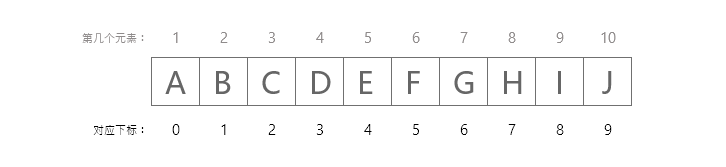
数组下标对应位序
第一个元素将存储在array[0]中,第二个元素将存储在array[1]中,等等。因此,最后一个元素,即第10个元素,将被存储在array[9]中。 在计算机中存储如下图所示。
当我们想要存储大量相同类型的数据时,通常会使用数组。当然,数组也有一些限制,比如:
数组的大小是固定的。
数据元素存储在连续的内存位置中,但是内存中剩余的大小可能不足以容纳当前数组。
元素的插入和删除会很麻烦。
链表(Linked Lists)
链表是一种非常灵活的动态数据结构,其中元素(称为节点)形成一个顺序列表。 与静态数组相比,我们不需要担心链表中将存储多少个元素。这个特性使我们能够编写需要较少维护的健壮程序。在链表中,每个节点都有data域和next指针域:
data域:存放该节点或与该节点对应的任何其他数据的值。
next指针域:指向列表中的下一个节点的指针或链接。
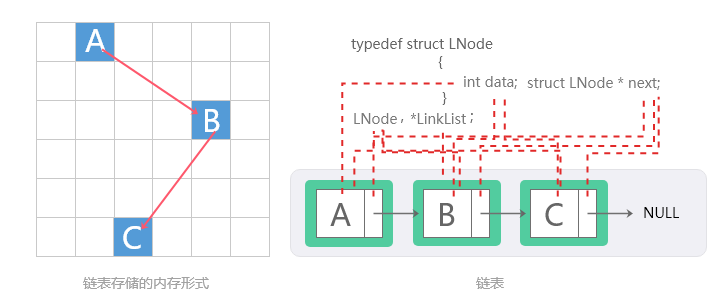
链表结构
列表中的最后一个节点包含一个NULL指针,表明它是当前列表的尾。由于节点的内存是在添加到列表中时动态分配的,因此可以添加到列表中的节点总数仅受可用内存量的限制。具体结构可见下图:
栈(Stacks)
栈是一种线性数据结构, 其中元素的插入和删除只在一端完成,这被称为栈顶。 栈被称为先入后出(LIFO)结构,因为添加到堆栈中的最后一个元素是从堆栈中删除的第一个元素。在计算机的内存中,堆栈可以使用数组或链表来实现。
下面可视化操作显示了一个栈的数组实现。每个栈都有一个与其关联的变量top,用于指向最上面的元素。这是将从中添加或删除元素的位置。
栈支持push 入栈和pop 出栈 操作,push 就是在从栈顶中压入一个元素,pop 就是在栈顶中弹出一个元素,即增和删。
💡 提示
点击下方的入栈、出栈按钮。可以明了的理解到什么是先入后出。
栈 | 可视化完整可视化
1.1 What is a Data Structure? - Data Structures Tutorial Visualize your code with animations

Linear List, Stack, and Sequential List: A Beginner's Guide to Core Data Structures
Welcome to the world of data structures and algorithms. If you are a student or a self-taught programmer, you have likely encountered terms like Linear List, Stack, and Sequential List. These are the building blocks of computer science. Understanding them is crucial for writing efficient code and solving complex problems. This article provides a clear, detailed explanation of these fundamental concepts. We will explore their principles, characteristics, and real-world applications. By the end, you will have a solid foundation to build upon. We will also introduce how a data structure visualization platform can help you learn these concepts more effectively.
What is a Linear List?
A linear list is the most basic and widely used data structure. It is an ordered collection of elements. Each element has a specific position or index within the list. The key property of a linear list is that each element (except the first and last) has a unique predecessor and a unique successor. This creates a linear sequence. Think of it like a shopping list or a queue of people. The order matters, and you can access any item by its position.
There are two primary ways to implement a linear list: using an array (sequential storage) or using linked nodes (linked storage). The array-based implementation is called a Sequential List. The node-based implementation is called a Linked List. Both have their own strengths and weaknesses. We will focus on the Sequential List in this article.
Understanding the Sequential List
A Sequential List stores elements in contiguous memory locations. This means that the elements are placed one after another in memory. This is exactly how an array works in most programming languages. For example, in C, Java, or Python, when you declare an array, the system allocates a block of memory to hold all the elements. This contiguous storage allows for very fast access to any element. To get the element at index i, the system simply calculates the memory address as base_address + i * element_size. This is a constant time operation, denoted as O(1).
However, this speed comes at a cost. Inserting or deleting an element in the middle of a Sequential List is slow. Because the elements are stored contiguously, you must shift all subsequent elements to make room or fill a gap. For example, if you want to insert a new element at position 2, you must move every element from position 2 onwards one step to the right. This shifting operation takes time proportional to the number of elements after the insertion point. In the worst case, it takes O(n) time, where n is the number of elements in the list.
Another characteristic of a Sequential List is its fixed size. When you create an array, you must specify its maximum capacity. If you need to store more elements than the initial capacity, you must create a new, larger array and copy all the elements over. This is called dynamic resizing. While many programming languages offer dynamic arrays (like Python's list or Java's ArrayList), the underlying principle remains the same. The resizing operation is expensive, so it is important to choose an appropriate initial size.
Characteristics of a Sequential List
Let us summarize the key characteristics of a Sequential List. First, it provides random access. You can access any element directly using its index in constant time. This is its greatest advantage. Second, it has a fixed or dynamically resizable capacity. Third, insertion and deletion operations are expensive, especially near the beginning of the list. Fourth, it uses memory efficiently for storing the elements themselves, but it may waste memory if the allocated capacity is not fully used. Fifth, it is cache-friendly. Because the elements are stored contiguously, the CPU cache can prefetch them, leading to faster access in practice.
What is a Stack?
A stack is a special type of linear list. It follows the Last-In-First-Out (LIFO) principle. This means that the last element added to the stack is the first one to be removed. Think of a stack of plates. You add a plate to the top of the stack. When you need a plate, you take the top one. You cannot remove a plate from the middle or bottom without first removing the plates above it. This simple rule makes stacks incredibly useful for many programming tasks.
A stack supports two main operations: push and pop. The push operation adds an element to the top of the stack. The pop operation removes and returns the top element. There is also a peek or top operation that returns the top element without removing it. These operations are all very fast. If the stack is implemented using a Sequential List, push and pop are typically O(1) operations, assuming there is space available.
Stack Implementation Using a Sequential List
A stack can be easily implemented using a Sequential List. You can use an array to store the elements and an integer variable to keep track of the top index. When you push an element, you increment the top index and store the new element at that position. When you pop an element, you return the element at the top index and then decrement the top index. This is simple and efficient. The array-based stack is the most common implementation. However, you must handle the case when the stack is full. This is called a stack overflow. Similarly, trying to pop from an empty stack is called a stack underflow.
The array-based stack inherits the properties of the Sequential List. It provides fast access to the top element. But it has a fixed capacity. If you need a stack that can grow dynamically, you can use a dynamic array. This is how most programming languages implement their built-in stack data structures.
Characteristics of a Stack
The stack has several important characteristics. First, it is a restricted data structure. You can only access the top element. This restriction is intentional and makes the stack predictable and safe for certain tasks. Second, all operations (push, pop, peek) are very fast, typically O(1). Third, it is simple to implement and understand. Fourth, it is a fundamental tool for many algorithms, including expression evaluation, syntax parsing, and backtracking.
Application Scenarios for Linear List and Sequential List
Linear lists, especially Sequential Lists, are used everywhere. They are the foundation for many other data structures. Here are some common application scenarios. First, storing a collection of items where order matters. For example, a list of student names in a class, a list of products in an inventory, or a list of tasks in a to-do app. Second, implementing other data structures like stacks, queues, and heaps. Third, storing data that needs to be accessed frequently by index. For example, a lookup table or a cache. Fourth, in image processing, where pixels are stored in a 2D array. Fifth, in scientific computing, where vectors and matrices are stored as arrays.
Sequential Lists are ideal when you need fast random access and you do not need to perform many insertions or deletions in the middle. They are also a good choice when the size of the data is known in advance or changes infrequently.
Application Scenarios for Stack
Stacks are incredibly versatile. Here are some of the most common applications. First, function call management in programming languages. When a function is called, the system pushes the return address and local variables onto the call stack. When the function returns, the system pops this information. This allows for nested function calls and recursion. Second, expression evaluation. Compilers use stacks to evaluate arithmetic expressions, especially those in postfix notation. Third, syntax parsing. Stacks are used to check if parentheses, brackets, and braces are balanced in code. Fourth, undo/redo functionality in text editors and image editors. Each action is pushed onto a stack. Undo pops the last action. Fifth, backtracking algorithms, such as depth-first search in graphs and mazes. The algorithm uses a stack to remember the path it has taken.
Stacks are also used in web browsers for the back button. Each page you visit is pushed onto a stack. When you click back, the previous page is popped. In short, any situation where you need to process items in reverse order of their arrival is a good candidate for a stack.
Why Use a Data Structure Visualization Platform?
Learning data structures and algorithms can be challenging. Textbooks and code examples are helpful, but they can be abstract. A data structure visualization platform changes that. It brings these concepts to life. You can see how a Sequential List stores elements in memory. You can watch how a stack grows and shrinks as you push and pop elements. This visual approach makes learning faster and more intuitive.
A good visualization platform allows you to interact with the data structures. You can add, remove, and search for elements. You can see the underlying code execute step by step. You can observe how the time complexity affects the performance. This hands-on experience is invaluable for building a deep understanding.
Features and Advantages of a Visualization Platform
Here are the key features and advantages of using a data structure visualization platform. First, real-time visualization. You can see the data structure change as you perform operations. This makes abstract concepts concrete. Second, step-by-step animation. You can control the speed of the animation. This allows you to focus on each step of an algorithm. Third, interactive controls. You can input your own data and test different scenarios. Fourth, code integration. Many platforms show the corresponding code for each operation. This helps you connect the visual representation with the actual implementation. Fifth, support for multiple data structures. A good platform covers all the major data structures, including arrays, linked lists, stacks, queues, trees, graphs, and hash tables. Sixth, algorithm visualization. You can see how sorting algorithms, search algorithms, and graph algorithms work. This is a powerful learning tool.
The main advantage is that it reduces the cognitive load on the learner. Instead of trying to imagine how a stack works, you can simply watch it. This is especially helpful for beginners. It also helps advanced learners debug their code and optimize their algorithms. By seeing the data structure in action, you can spot inefficiencies and errors more easily.
How to Use a Data Structure Visualization Platform
Using a data structure visualization platform is straightforward. Here is a typical workflow. First, select the data structure you want to learn. For example, choose "Stack". The platform will display an empty stack. Second, use the provided controls to perform operations. Click the "Push" button to add an element. You will see the element appear at the top of the stack. Click the "Pop" button to remove the top element. You will see it disappear. Third, observe the changes in the visualization. Notice how the top pointer moves. Fourth, look at the code panel. It will show you the code that is being executed for each operation. This helps you understand the implementation. Fifth, experiment with different inputs. Try pushing multiple elements and then popping them. Try to cause a stack overflow by pushing too many elements. This will help you understand the limitations of the data structure. Sixth, move on to more complex algorithms. For example, use the stack to solve the balanced parentheses problem. The platform will show you each step of the algorithm.
Many platforms also allow you to write your own code and visualize its execution. This is a great way to debug your assignments. You can set breakpoints and step through your code, watching how the data structure changes. This is much more effective than using print statements or a debugger alone.
Conclusion
Linear List, Sequential List, and Stack are fundamental data structures that every programmer must understand. The Sequential List provides fast random access but slow insertions and deletions. The Stack is a restricted linear list that follows the LIFO principle. It is used in countless applications, from function calls to undo systems. Learning these concepts is the first step toward mastering data structures and algorithms. A data structure visualization platform is an excellent tool to accelerate your learning. It provides a visual, interactive, and intuitive way to understand how these structures work. By using such a platform, you can build a strong foundation and become a more confident and effective programmer. Start exploring today and see the difference that visualization can make.
队列(Queues)
队列是一种先进先出(FIFO)的数据结构,其中首先插入的元素是第一个要取出的元素。 队列中的元素在队尾添加,然后在队头删除。 与栈一样,队列也可以通过使用数组或链表来实现。 每个队列都有队头和队尾,分别指向可以进行删除和插入的位置。
队列 | 可视化完整可视化
1.1 What is a Data Structure? - Data Structures Tutorial Visualize your code with animations
Queue Data Structure with Sequential List: A Complete Visual Guide for Algorithm Learners
Welcome to the world of data structures and algorithms. If you are a computer science student or a self-taught programmer, you have likely encountered the concept of a queue. A queue is one of the most fundamental linear data structures, and when implemented using a sequential list (array-based list), it becomes a powerful tool for solving real-world problems. In this article, we will explore the principles, characteristics, and application scenarios of a queue based on a sequential list. We will also show you how our Data Structure & Algorithm Visualization Platform can help you master this concept through interactive, step-by-step animations.
What is a Queue? The Core Principle
A queue is a linear data structure that follows the First In, First Out (FIFO) principle. This means that the first element added to the queue will be the first one to be removed. Imagine a line of people waiting to buy tickets at a cinema: the person who arrives first gets served first, and new arrivals join at the end of the line. In computer science, queues are used everywhere, from managing tasks in an operating system to handling requests on a web server.
When we implement a queue using a sequential list (also known as an array-based list), we store the elements in contiguous memory locations. The sequential list provides a fixed or dynamic array that holds the queue elements. Two pointers (or indices) are typically used: a front pointer that indicates the position of the first element, and a rear pointer that indicates the position where the next element will be inserted. This array-based implementation is simple, cache-friendly, and offers fast access to elements.
Sequential List (Array-Based) Queue: Detailed Mechanism
In a sequential list queue, the underlying storage is an array. The queue operations are performed using the front and rear indices. Let's break down the core operations:
Enqueue (Insertion): When you add an element to the queue, it is placed at the position indicated by the rear pointer. After insertion, the rear pointer is incremented to point to the next empty slot. If the array is full and dynamic resizing is not supported, an overflow condition occurs.
Dequeue (Removal): To remove an element, you access the element at the front pointer. Then, the front pointer is incremented by one. The removed element is no longer considered part of the queue. If the front pointer catches up to the rear pointer, the queue is empty.
Peek (Front): This operation returns the element at the front of the queue without removing it. It is useful when you need to inspect the next element to be processed.
IsEmpty / IsFull: These utility functions check whether the queue is empty (front == rear) or full (rear == array capacity) in a static implementation.
One important nuance of a simple array-based queue is the "false overflow" problem. After several enqueue and dequeue operations, the rear pointer may reach the end of the array even though there are empty slots at the beginning (because front has moved forward). To solve this, we often use a circular queue (also called a ring buffer). In a circular sequential list queue, the indices wrap around using modulo arithmetic. This maximizes space utilization and is a common variation you will learn in your algorithms course.
Characteristics of a Sequential List Queue
Understanding the characteristics helps you choose the right implementation for your specific problem. Here are the key features:
1. Memory Efficiency: An array-based queue uses contiguous memory, which reduces overhead compared to a linked list implementation. There are no pointers to store for each element, only the array itself and two indices.
2. Cache Locality: Because elements are stored sequentially in memory, accessing them benefits from CPU cache prefetching. This makes array-based queues faster in practice for many workloads.
3. Fixed or Dynamic Size: A static sequential list queue has a fixed capacity, which can lead to overflow if not managed carefully. A dynamic array (like Python's list or Java's ArrayList) can grow, but resizing is an O(n) operation that may cause occasional latency.
4. Constant Time Operations: Enqueue, dequeue, and peek all have O(1) average time complexity in a properly implemented sequential list queue (assuming no resize is needed). This makes it highly efficient for most use cases.
5. Simple Implementation: Compared to a linked list queue, the array-based version is easier to code and debug, especially for beginners. However, you must handle the circular wrap-around logic carefully.
6. Limited Flexibility: The sequential list queue is not ideal for frequent insertions or deletions in the middle, but that is not the purpose of a queue anyway. It is optimized for FIFO operations.
Real-World Application Scenarios
Queues are everywhere. Here are some classic application scenarios where a sequential list queue (or its circular variant) is the perfect choice:
1. Task Scheduling in Operating Systems: The OS uses a ready queue to manage processes waiting for CPU time. A simple FIFO queue ensures fairness. When a process arrives, it is enqueued; when the CPU is free, it dequeues the next process.
2. Breadth-First Search (BFS) in Graphs: BFS uses a queue to explore nodes level by level. You enqueue the starting node, then repeatedly dequeue a node and enqueue its unvisited neighbors. The sequential list queue provides the necessary O(1) operations for efficient traversal.
3. Print Spooling: When multiple documents are sent to a printer, they are stored in a print queue. The printer dequeues and prints documents in the order they were received.
4. Web Server Request Handling: In a high-traffic web server, incoming HTTP requests are placed in a queue. Workers (threads or processes) dequeue requests and process them. This prevents server overload and ensures orderly processing.
5. Data Buffers: Queues are used as buffers in streaming applications (e.g., video playback) to smooth out data rate variations. A circular sequential list queue is often used because of its efficient memory usage.
6. Message Queues: In distributed systems, message queues (like RabbitMQ or Kafka) rely on FIFO ordering to ensure reliable communication between services.
Visualizing the Queue: How Our Platform Makes Learning Easier
Learning data structures and algorithms can be challenging, especially when you are trying to understand dynamic operations like enqueue and dequeue. Static diagrams in textbooks are helpful, but they do not show the step-by-step changes in memory. This is where our Data Structure & Algorithm Visualization Platform comes in. We provide an interactive, animated environment where you can see exactly what happens to the array, front pointer, and rear pointer with every operation.
Key Features of Our Visualization Platform:
• Step-by-Step Animation: You can click "Enqueue" or "Dequeue" and watch the element move into the array, the rear pointer increment, and the front pointer shift. This makes the abstract concept concrete.
• Circular Queue Mode: You can switch between a linear queue and a circular queue to see how the modulo operation prevents false overflow. The visual wrap-around effect is particularly enlightening.
• Real-Time Pointer Tracking: The front and rear pointers are highlighted with distinct colors. You can see their positions update instantly, helping you understand the relationship between pointer movement and queue state.
• Code Synchronization: For each operation, the corresponding code (in C++, Java, or Python) is displayed and highlighted. This bridges the gap between theory and implementation.
• Customizable Speed: You can slow down the animation to examine every detail, or speed it up for a quick review. This is perfect for learners at different levels.
• Error Simulation: Try to dequeue from an empty queue or enqueue into a full static queue. The platform will show an error message and explain why the operation is invalid.
How to Use the Platform to Master Queue with Sequential List
Getting started is simple. Follow these steps to deepen your understanding:
Step 1: Access the Queue Module. From the platform's main menu, select "Queue" and then choose "Sequential List (Array) Implementation." You will see a visual representation of an empty array with front and rear pointers at index 0.
Step 2: Perform Enqueue Operations. Enter a value (e.g., 5, 10, 15) and click the "Enqueue" button. Watch as the value appears in the array at the rear position, and the rear pointer moves right. Repeat this a few times to see the queue grow.
Step 3: Observe the Dequeue Process. Click "Dequeue." The element at the front pointer will be highlighted and then removed. The front pointer advances. Notice how the space at the beginning becomes empty (in a linear queue) or is reused (in a circular queue).
Step 4: Toggle Circular Mode. Activate the circular queue option. Continue enqueuing and dequeuing. When the rear pointer reaches the end, it will wrap around to the beginning if there is space. This visual feedback is invaluable for understanding the modulo operation.
Step 5: Test Edge Cases. Try to dequeue when the queue is empty. The platform will show a warning. Similarly, try to enqueue into a full static array. You will see the "overflow" condition in action.
Step 6: Review the Code. As you perform each operation, look at the code panel. You will see the exact lines being executed. This helps you connect the visual behavior to actual programming logic.
Why Visualization is Critical for Learning Data Structures
Research in educational psychology shows that interactive visualization significantly improves comprehension and retention for complex topics like data structures. When you can see the pointers moving and the array filling up, you build a mental model that is much stronger than what you get from reading text alone. Our platform is designed specifically for learners who want to go beyond memorization and truly understand how things work under the hood.
For a sequential list queue, the main pitfalls for beginners are understanding the circular wrap-around and the difference between a static and dynamic array. Our platform allows you to experiment with both, so you can see exactly when a resize happens (in dynamic mode) and how it affects performance. You can also visualize the "false overflow" problem in a linear queue, which motivates the need for the circular design.
Common Mistakes and How Visualization Helps Avoid Them
Many students make the following mistakes when learning queue with sequential list:
Mistake 1: Confusing front and rear pointers. In our platform, front is always shown in blue and rear in red. You will never mix them up because you see them move in real time.
Mistake 2: Forgetting to check for empty or full conditions. The platform forces you to handle these edge cases by showing explicit warnings. This reinforces the importance of precondition checks.
Mistake 3: Misunderstanding circular queue indexing. The visual wrap-around makes the modulo operation intuitive. You can see that (rear + 1) % capacity brings you back to index 0.
Mistake 4: Thinking dequeue physically removes the element. In an array-based queue, dequeue just moves the front pointer. The platform shows that the old element is still in memory but no longer considered part of the queue. This is a crucial insight.
Advanced Topics: Dynamic Array Queue and Complexity Analysis
Once you have mastered the basic sequential list queue, you can explore the dynamic array version on our platform. The dynamic queue automatically resizes when the array is full. We visualize the resizing process: a new array with double the capacity is created, and all elements are copied over. You will see the amortized O(1) cost in action. This is a perfect segue into learning about amortized analysis.
Our platform also includes a complexity panel that displays the time and space complexity for each operation. For a sequential list queue, you will see O(1) for enqueue, dequeue, and peek (average), and O(n) for resize (occasional). This real-time feedback helps you internalize the efficiency trade-offs.
Conclusion: Start Visualizing Your Queue Today
The queue data structure implemented with a sequential list is a cornerstone of computer science. Whether you are preparing for coding interviews, studying for an exam, or building real-world applications, a deep understanding of queues is essential. Our Data Structure & Algorithm Visualization Platform is your perfect companion on this journey. With interactive animations, real-time code highlighting, and customizable experiments, you will master the queue in no time.
Do not just read about pointers and arrays—see them in action. Sign up for our platform (free tier available) and start your hands-on learning experience. Your future self, writing efficient and bug-free code, will thank you.
树(Tree)
树是一种非线性的数据结构,它由一组按 分层顺序排列的节点组成。 其中一个节点被指定为根节点,其余的节点可以被划分为不相交的集合,这样每个集合都是根的一个子树。
树的最简单的形式是二叉树。 二叉树由一个根节点和左右子树组成,其中两个子树也是二叉树。每个节点都包含一个数据元素、一个指向左子树的左指针和一个指向右子树的右指针。根元素是由一个“根”指针指向的最顶部的节点。
二叉树 | 可视化完整可视化
1.1 What is a Data Structure? - Data Structures Tutorial Visualize your code with animations
Tree, Binary Search, Linked List: A Visual Guide for Data Structures & Algorithms Learners
Welcome to the world of data structures and algorithms. If you are a learner struggling to understand how a binary search tree differs from a linked list, or how binary search works on a sorted array, you are in the right place. This article explains these core concepts in plain English, and shows you how a data structure visualization platform can make these abstract ideas concrete. Whether you are preparing for coding interviews or building your foundation in computer science, mastering these structures is essential.
1. What is a Tree? (The Hierarchical Data Structure)
A tree is a non-linear data structure that simulates a hierarchical relationship between elements. Think of a family tree, a company org chart, or the folder system on your computer. In computer science, a tree consists of nodes connected by edges. The topmost node is called the root. Each node can have zero or more child nodes. Nodes with no children are called leaves.
Trees are everywhere: the Document Object Model (DOM) in web browsers, file systems, and even in network routing. The most common type of tree used in algorithms is the binary tree, where each node has at most two children, often called the left child and the right child. A special kind of binary tree is the Binary Search Tree (BST), which we will discuss next.
2. Binary Search Tree (BST) – The Ordered Tree
A Binary Search Tree (BST) is a binary tree that maintains a specific order property: for every node, all values in the left subtree are smaller than the node's value, and all values in the right subtree are larger. This property makes searching extremely efficient. For example, if you want to find the number 42 in a BST, you start at the root. If 42 is smaller than the root, you go left; if larger, you go right. You repeat this process until you find the value or reach a leaf.
Why is BST important? It allows binary search on a tree structure. In the average case, searching, insertion, and deletion take O(log n) time, where n is the number of nodes. However, if the tree becomes unbalanced (like a straight line), performance degrades to O(n). That's why balanced trees like AVL or Red-Black trees exist, but BST is the foundational concept every learner must know.
Real-world applications: Implementing dictionaries, autocomplete features, and database indexing often use BST variants. When you type a query into a search engine, a tree-like structure helps find relevant results quickly.
3. Binary Search – The Algorithm on Sorted Data
Binary search is an algorithm that finds the position of a target value within a sorted array. It works by repeatedly dividing the search interval in half. Compare the target to the middle element. If they are equal, you found it. If the target is smaller, search the left half; if larger, search the right half. This process continues until the target is found or the interval is empty.
Binary search is incredibly efficient with a time complexity of O(log n). For example, searching a list of 1,000,000 items takes at most 20 comparisons. Compare this to linear search which might take 1,000,000 comparisons in the worst case. However, binary search requires that the data is sorted beforehand, which adds a preprocessing cost.
Where do we use binary search? It is used in debugging (git bisect), in mathematical functions (finding square roots), and in many standard library functions like Arrays.binarySearch() in Java or bisect in Python. Understanding binary search is a prerequisite for more advanced algorithms like binary search trees and balanced trees.
4. Linked List – The Linear Chain of Nodes
A linked list is a linear data structure where each element (called a node) contains data and a reference (or pointer) to the next node in the sequence. Unlike arrays, linked lists do not store elements in contiguous memory locations. This gives them flexibility: you can easily insert or delete nodes without shifting elements, as you would in an array.
There are several types of linked lists: singly linked list (each node points to the next), doubly linked list (nodes point to both next and previous), and circular linked list (the last node points back to the first). Linked lists are simple but powerful. However, they have drawbacks: accessing an element by index takes O(n) time because you must traverse from the head.
Common applications: Implementing stacks, queues, and graph adjacency lists. The undo feature in software often uses a linked list. Also, the browser's back button uses a doubly linked list of visited pages.
5. How These Three Concepts Connect
At first glance, trees, binary search, and linked lists seem separate. But they are deeply connected. A Binary Search Tree is essentially a linked structure where each node has left and right pointers (similar to a linked list but with two links). The binary search algorithm is the core logic used to navigate a BST efficiently. In fact, a BST can be seen as a dynamic data structure that supports binary search without needing a sorted array, because the ordering is built into the structure.
When you visualize a BST, you see nodes connected by pointers, much like a linked list. But the tree structure allows branching, which gives logarithmic performance. Understanding the linked list helps you understand how trees store references. Understanding binary search helps you understand why BSTs are fast. Mastering these three concepts together gives you a solid foundation for more complex topics like heaps, graphs, and self-balancing trees.
6. Why Visual Learning is Critical for Data Structures
Reading text descriptions of data structures can be confusing. When you see a paragraph about "left subtree" and "right subtree," it is hard to imagine the actual flow. That is where a data structure visualization platform becomes invaluable. Visualization turns abstract concepts into moving diagrams. You can see how a node is inserted into a BST, how pointers change in a linked list, or how binary search eliminates half of the array at each step.
Research shows that interactive visual learning improves retention and understanding. When you can step through an algorithm manually, you build mental models that last. Instead of memorizing code, you understand the "why" behind each operation. This is especially important for coding interviews, where you need to reason about trade-offs and edge cases.
7. Introducing Our Data Structure & Algorithm Visualization Platform
Our platform is designed specifically for learners like you. It provides interactive animations for trees, binary search, linked lists, and many other data structures. You can create your own data, step through algorithms one operation at a time, and see exactly how memory and pointers change. We believe that seeing is understanding.
Key features:
- Live visualization: Every insertion, deletion, or search is animated in real time. You can pause, rewind, or slow down the animation.
- Multiple data structures: From linked lists to binary trees to hash tables, we cover the most common topics in computer science curricula.
- Code integration: See the corresponding code (in Python, Java, or C++) highlighted as the visualization runs. This bridges the gap between theory and implementation.
- Customizable input: You can enter your own numbers or test cases. For example, create a degenerate tree and see why it becomes slow.
- Practice mode: Quiz yourself on algorithm steps. The platform will ask you what the next step is, reinforcing active learning.
8. How to Use the Platform for Learning Trees, Binary Search, and Linked Lists
Here is a step-by-step guide to get the most out of our visualization tool:
Step 1: Start with Linked Lists. Create a singly linked list with 5 nodes. Insert a new node at the head, then delete a node from the middle. Watch how the pointers change. Notice that you do not need to shift elements like an array. This will give you a concrete understanding of dynamic memory.
Step 2: Move to Binary Search. Select the "Binary Search" module. Enter a sorted array of numbers. Run the search for a target. The platform will highlight the middle element and show the shrinking search interval. Pay attention to the logarithmic reduction. Try searching for a number that does not exist to see the termination condition.
Step 3: Explore Binary Search Trees. Now choose "BST". Insert numbers one by one. Watch how the tree grows. Notice that if you insert numbers in sorted order, the tree becomes a linked list (skewed). Then insert in a random order and see how balanced the tree becomes. This visual comparison explains why tree balancing is important.
Step 4: Combine them. Use the platform to compare the performance of searching in a linked list vs. a BST. Search for the same value in both structures. You will see the linear traversal in the linked list and the logarithmic hops in the BST. This drives home the practical advantage of trees.
9. Deeper Dive: Visualizing Algorithm Complexity
One of the hardest parts of learning data structures is understanding time complexity. Our platform includes a complexity meter that shows how many operations have been performed. For example, when you run binary search on an array of size 16, the meter shows only 4 comparisons. For a linked list search, it shows up to 16. This real-time feedback makes the concept of O(log n) vs O(n) intuitive.
You can also visualize the worst-case, average-case, and best-case scenarios. For a BST, insert numbers in ascending order to see the worst-case (linked list shape). Then insert the same numbers in a balanced order to see the average-case. The platform will even suggest a different order or show you how a self-balancing tree (like AVL) would restructure itself.
10. Common Pitfalls and How Visualization Helps
Many learners confuse the concept of "binary search" with "binary search tree". They might think a BST is just a way to store data, but forget that the search algorithm is what makes it powerful. With visualization, you see that the BST uses the same divide-and-conquer logic as binary search. Another common mistake is forgetting that linked lists do not support random access. When you try to "jump" to the middle of a linked list, the visualization shows you that you must walk node by node. This mistake becomes obvious when you see the pointer moving step by step.
Visualization also clarifies recursion. When you perform a recursive traversal of a tree, the platform can show the call stack, making it clear how each recursive call returns. This is a feature many textbooks lack.
11. Beyond the Basics: Advanced Topics You Can Explore
Once you master trees, binary search, and linked lists, our platform can help you move to more advanced topics:
- Tree traversals: In-order, pre-order, post-order, and level-order. See how the order changes with different traversals.
- Balanced trees: AVL and Red-Black trees. Watch rotations happen in real time.
- Graph algorithms: BFS and DFS are built on queue and stack structures, which are often implemented using linked lists.
- Heaps: A complete binary tree used for priority queues. Visualize heapify operations.
- Hash tables: Understand collision resolution with chaining (linked lists) or open addressing.
Each module builds on the foundational concepts you learned here. The visual approach ensures you never feel lost.
12. Why Our Platform is the Best Choice for Self-Learners
There are many resources online, but our platform is designed with the learner's journey in mind. We do not just show you a static diagram; we let you interact with the data. You can break the algorithm, test edge cases, and see the consequences immediately. This trial-and-error approach is how real learning happens.
Additionally, our platform is free to use for basic modules, and we offer a premium version with advanced analytics, progress tracking, and coding challenges. Whether you are a student in a data structures course or a professional preparing for interviews, our visualization platform will accelerate your understanding.
We also provide documentation and tutorials for each data structure. The tutorials include common interview questions, such as "Reverse a linked list" or "Check if a binary tree is a BST". You can solve these problems while watching the visualization, which helps you debug your logic.
13. Getting Started: Your First Visualization Session
Ready to dive in? Here is a quick start:
- Go to our platform and select "Linked List" from the menu.
- Click "Create" and add numbers 10, 20, 30, 40, 50.
- Now click "Search" and enter 30. Watch the pointer move from node to node.
- Next, switch to "Binary Search Tree". Insert the same numbers in random order. See the tree grow.
- Finally, try "Binary Search" on a sorted array. Notice how fast it finds the target.
Within 10 minutes, you will have a solid grasp of how these structures work and how they differ. You can then explore more advanced features at your own pace.
14. Conclusion: Master Data Structures with Visualization
Understanding trees, binary search, and linked lists is a rite of passage for every programmer. These concepts are not just academic; they are used daily in software engineering. A solid grasp of them will help you write faster code, design better systems, and ace technical interviews.
But reading about them is not enough. You need to see them in action. Our data structure visualization platform provides that missing link. It transforms passive reading into active exploration. We invite you to try it today and experience the difference. Whether you are a beginner or revisiting fundamentals, the visual approach will deepen your understanding and make learning enjoyable.
Remember: in the world of data structures, seeing truly is believing. Start your visual learning journey now and unlock the power of algorithms.
图(Graphs)
图是一种非线性的数据结构,它是连接这些顶点的顶点(也称为节点)和边的集合。图通常被视为树结构的泛化,其中树节点之间不是纯粹的父子关系,节点之间的任何复杂关系。在树状结构中,节点可以有任意数量的子节点,但只有一个父节点,但是在图中却没有这些限制。
图的数据结构 | 可视化完整可视化
1.1 What is a Data Structure? - Data Structures Tutorial Visualize your code with animations
Understanding Graph Storage Structures: A Complete Guide for Data Structure Learners
Graphs are one of the most fundamental and versatile data structures in computer science. They model relationships between entities, making them essential for solving problems in networking, social media analysis, route planning, and countless other domains. However, to work with graphs effectively, you must first understand how they are stored in memory. This article provides a comprehensive, beginner-friendly introduction to graph storage structures, covering their principles, characteristics, practical applications, and how interactive visualization tools can accelerate your learning.
What Is a Graph Data Structure?
A graph is a non-linear data structure consisting of a finite set of vertices (also called nodes) and a set of edges that connect pairs of vertices. Formally, a graph G is defined as G = (V, E), where V is the set of vertices and E is the set of edges. Graphs can be directed (edges have a direction from one vertex to another) or undirected (edges have no direction). They can also be weighted (edges have associated costs or weights) or unweighted. The way you store a graph in computer memory directly impacts the efficiency of algorithms that traverse or manipulate it.
Why Graph Storage Structures Matter
Choosing the right storage structure for a graph is critical because it affects both time complexity and space complexity of graph operations. For example, checking whether two vertices are adjacent can be O(1) in one representation but O(V) in another. Similarly, iterating over all neighbors of a vertex can be fast or slow depending on the storage method. Understanding these trade-offs is essential for writing efficient code and passing technical interviews. The three primary graph storage structures are adjacency matrix, adjacency list, and edge list. Each has unique strengths and weaknesses.
Adjacency Matrix: The Direct Representation
Principle
An adjacency matrix is a 2D array of size V × V, where V is the number of vertices. Each cell matrix[i][j] indicates whether there is an edge from vertex i to vertex j. For unweighted graphs, the cell typically stores 1 (or true) if an edge exists and 0 (or false) otherwise. For weighted graphs, the cell stores the weight of the edge, and a special value (like infinity or -1) indicates no edge.
Characteristics
The adjacency matrix is simple to understand and implement. It offers O(1) time complexity for checking if a specific edge exists between two vertices. Adding or removing an edge also takes O(1) time. However, its space complexity is O(V²), which becomes prohibitively large for sparse graphs (graphs with relatively few edges). For a graph with 10,000 vertices, the matrix would require 100 million cells, most of which would be empty. This makes adjacency matrices suitable only for dense graphs where the number of edges is close to V².
Application Scenarios
Adjacency matrices are commonly used in:
- Graph algorithms that require frequent edge existence checks, such as Floyd-Warshall for all-pairs shortest paths.
- Small to medium-sized dense graphs where memory is not a constraint.
- Hardware implementations where the matrix maps directly to physical circuits.
- Representing complete graphs in theoretical computer science research.
Adjacency List: The Space-Efficient Choice
Principle
An adjacency list stores a graph as an array of lists. The array has one entry per vertex, and each entry points to a list (or vector, or linked list) containing all vertices adjacent to that vertex. For weighted graphs, each element in the list also stores the weight of the edge. This representation only stores edges that actually exist, making it much more space-efficient for sparse graphs.
Characteristics
The space complexity of an adjacency list is O(V + E), where E is the number of edges. This is significantly better than O(V²) for sparse graphs. Checking if a specific edge exists requires O(degree(v)) time in the worst case, where degree(v) is the number of neighbors of vertex v. However, iterating over all neighbors of a vertex is very efficient, taking O(degree(v)) time. Adding an edge is typically O(1) if using a dynamic array or hash set, while removing an edge may require O(degree(v)) time.
Application Scenarios
Adjacency lists are the most commonly used graph storage structure in practice. They are ideal for:
- Breadth-first search (BFS) and depth-first search (DFS) algorithms that need to explore neighbors efficiently.
- Dijkstra's shortest path algorithm on sparse graphs.
- Social network analysis where most users have relatively few connections compared to the total user base.
- Web crawling where pages link to a small fraction of all web pages.
- Recommendation systems that model user-item interactions.
Edge List: The Minimalist Approach
Principle
An edge list is the simplest graph storage structure. It is just a list (or array) of all edges in the graph. Each edge is represented as a tuple (u, v) for unweighted graphs or (u, v, w) for weighted graphs. There is no direct indexing by vertex; you must scan the entire list to find edges incident to a particular vertex.
Characteristics
The space complexity of an edge list is O(E), which is optimal for storing only the edges. However, almost all graph operations are slow. Checking if an edge exists requires O(E) time in the worst case. Finding all neighbors of a vertex also requires O(E) time. Adding an edge is O(1) (just append to the list), but removing an edge requires O(E) time. Edge lists are rarely used as the primary storage for graph algorithms, but they are useful as an intermediate format for input/output and for certain specialized algorithms.
Application Scenarios
Edge lists are suitable for:
- Graph input/output formats where simplicity is more important than performance.
- Kruskal's minimum spanning tree algorithm, which sorts edges by weight.
- Storing graphs in databases where edges are rows in a table.
- Distributed graph processing where edges are partitioned across machines.
- Graph generation and serialization tasks.
Comparing the Three Storage Structures
To help you choose the right structure for your needs, here is a concise comparison:
| Property | Adjacency Matrix | Adjacency List | Edge List |
|---|---|---|---|
| Space Complexity | O(V²) | O(V + E) | O(E) |
| Edge Existence Check | O(1) | O(degree(v)) | O(E) |
| Neighbor Iteration | O(V) | O(degree(v)) | O(E) |
| Add Edge | O(1) | O(1) | O(1) |
| Remove Edge | O(1) | O(degree(v)) | O(E) |
| Best For | Dense graphs | Sparse graphs | Simple storage |
Advanced Graph Storage Considerations
Compressed Sparse Row (CSR) Format
For extremely large graphs that do not fit in memory, the Compressed Sparse Row (CSR) format is often used. CSR stores adjacency information in three arrays: one for the cumulative number of edges per vertex, one for the destination vertices, and optionally one for edge weights. CSR is the standard format for high-performance graph processing frameworks like GraphX and cuGraph because it offers a good balance between space efficiency and access speed.
Hash-Based Adjacency Lists
When you need fast edge existence checks without the memory overhead of an adjacency matrix, you can implement adjacency lists using hash sets instead of lists. This gives O(1) average time for edge existence checks while maintaining O(V + E) space. The trade-off is slightly higher memory overhead per edge due to hash table buckets.
Multi-Graphs and Hypergraphs
Some applications require storing multiple edges between the same pair of vertices (multi-graphs) or edges that connect more than two vertices (hypergraphs). Adjacency lists can be extended to handle multi-graphs by allowing duplicate entries. Hypergraphs require more specialized storage, often using incidence matrices or bipartite graph representations.
How to Choose the Right Graph Storage Structure
When deciding which graph storage structure to use, consider the following factors:
- Graph density: If the graph is dense (E is close to V²), use an adjacency matrix. If it is sparse (E is much less than V²), use an adjacency list.
- Required operations: If you need to frequently check edge existence, consider an adjacency matrix or a hash-based adjacency list. If you mainly iterate over neighbors, a standard adjacency list is best.
- Memory constraints: Edge lists use the least memory but are slow for most operations. Adjacency matrices use the most memory. Adjacency lists offer a good compromise.
- Algorithm requirements: Some algorithms are designed for specific storage structures. For example, Floyd-Warshall naturally works with adjacency matrices, while BFS and DFS are typically implemented with adjacency lists.
- Scalability: For graphs with millions of vertices, adjacency matrices are impractical. Use adjacency lists or CSR format instead.
Common Mistakes When Learning Graph Storage
Many students make the following mistakes when first learning about graph storage:
- Using an adjacency matrix for sparse graphs, leading to excessive memory usage and slow iteration.
- Not considering directed vs. undirected graphs. For undirected graphs, you must store each edge twice in an adjacency list or matrix.
- Ignoring weight storage. When using adjacency lists for weighted graphs, remember to store the weight alongside the neighbor vertex.
- Assuming O(1) edge removal in adjacency lists. If you use linked lists, removal requires O(degree(v)) time unless you have direct pointers.
- Forgetting about self-loops and parallel edges. Some algorithms require special handling for these cases.
Practical Applications of Graph Storage in Real-World Systems
Social Networks
Facebook, LinkedIn, and Twitter use graph databases to store user connections. Adjacency lists are the natural choice because social graphs are extremely sparse. Each user has hundreds or thousands of friends, but the total user base is billions. Graph storage structures enable friend recommendations, community detection, and influence propagation algorithms.
Route Planning and GPS Navigation
Google Maps and Waze represent road networks as weighted graphs where vertices are intersections and edges are road segments with weights representing distance or travel time. Adjacency lists are used because road networks are sparse (each intersection connects to only a few roads). Dijkstra's algorithm and A* search run efficiently on this representation.
Computer Networks
The internet is a massive graph of routers and connections. Network protocols use graph algorithms to find optimal routes for data packets. Adjacency matrices are sometimes used for small network segments, while adjacency lists scale to the global internet.
Recommendation Systems
Amazon and Netflix use bipartite graphs to model users and items. Edges represent purchases or ratings. Graph storage structures power collaborative filtering algorithms that suggest products or movies based on similar users' preferences.
Knowledge Graphs
Google's Knowledge Graph and Wikipedia's link structure are stored as directed graphs. Specialized graph databases like Neo4j use adjacency list-based storage to enable fast traversal for question answering and semantic search.
Learning Graph Storage with Interactive Visualization
Understanding graph storage structures can be challenging when you only see code and mathematical notation. This is where a data structures and algorithms visualization platform becomes invaluable. Our platform provides interactive, visual representations of graph storage structures that make abstract concepts concrete and memorable.
Key Features of Our Visualization Platform
- Live graph rendering: See vertices and edges drawn on screen as you build your graph.
- Side-by-side storage views: Watch how the adjacency matrix, adjacency list, and edge list update in real-time as you add or remove edges.
- Step-by-step algorithm execution: Visualize how BFS, DFS, Dijkstra, and other algorithms traverse the graph using different storage structures.
- Color-coded operations: Each vertex and edge is color-coded to show its state (unvisited, visited, in queue, etc.).
- Performance metrics: See time and space usage statistics for each storage structure as you interact with the graph.
- Customizable graph generation: Create random graphs, complete graphs, bipartite graphs, or import your own data.
- Code generation: Automatically generate Python, Java, C++, or JavaScript code for the current graph representation.
How to Use the Platform for Learning Graph Storage
- Start with a small graph: Add 3-5 vertices and a few edges. Observe how the adjacency matrix fills up and how the adjacency list grows.
- Toggle between directed and undirected: See how the storage changes when edges have direction. Notice that adjacency matrices become symmetric for undirected graphs.
- Add weights to edges: Watch how the adjacency matrix stores weights in cells and how adjacency lists store weight alongside neighbor references.
- Compare memory usage: Create a dense graph (many edges) and a sparse graph (few edges). See how the adjacency matrix memory grows quadratically while adjacency list memory grows linearly.
- Run graph algorithms: Execute BFS on the same graph stored as an adjacency matrix and as an adjacency list. Observe the difference in iteration speed and memory access patterns.
- Experiment with edge operations: Add and remove edges while watching the time taken for each operation in different storage structures.
- Test your understanding: Use the platform's quiz mode to predict how storage will change when you modify the graph.
Benefits of Visual Learning for Graph Storage
Research in educational psychology shows that visualization significantly improves understanding of abstract data structures. By seeing graph storage structures in action, you develop an intuitive grasp of concepts that are difficult to learn from text alone. Our platform helps you:
- Build mental models of how data is organized in memory.
- Understand trade-offs between different storage approaches.
- Debug your code by comparing your implementation's behavior with the visual representation.
- Prepare for technical interviews where graph problems are common.
- Retain knowledge longer through multi-sensory learning experiences.
Conclusion
Graph storage structures are a foundational topic in data structures and algorithms. Whether you choose an adjacency matrix, adjacency list, or edge list depends on the characteristics of your graph and the operations you need to perform. Adjacency matrices excel for dense graphs with frequent edge existence checks. Adjacency lists are the workhorse for most real-world applications due to their space efficiency and fast neighbor iteration. Edge lists serve specialized roles in input/output and certain algorithms.
Mastering these concepts requires hands-on practice. Our data structures and algorithms visualization platform provides the perfect environment to experiment with graph storage structures interactively. By seeing the data structures change as you manipulate the graph, you will develop a deep, intuitive understanding that will serve you well in coursework, technical interviews, and real-world software development. Start exploring graph storage today and transform abstract theory into practical knowledge.
❗️ 注意:
请注意,与树不同,图没有任何根节点。相反,图中的每个节点都可以与图中的每一个节点进行连接。当两个节点通过一条边连接时,这两个节点被称为相邻节点。例如,在上图中,节点A有两个邻居:B和D。